PiFlux · Volume 8
SDR Capabilities & vs. uConsole
The Advanced Radio external SDR, software stack, bands, antennas, and a head-to-head comparison with the Clockwork uConsole's SDR story
8.1 SDR on the PiFlux: Context
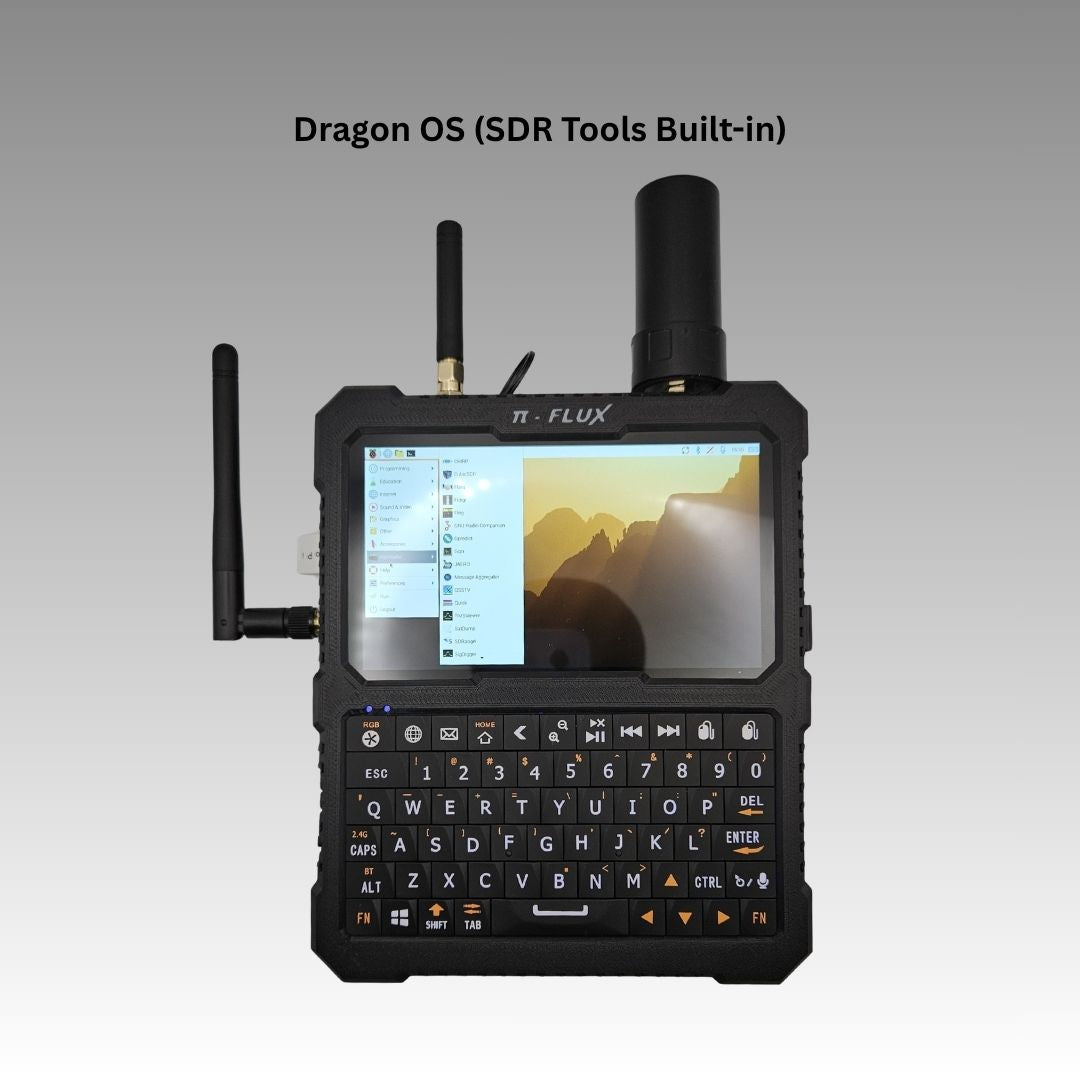
The PiFlux’s path into software-defined radio runs through a single add-on: the Advanced Radio module ($149, Volume 5 Section 3). It is worth stating precisely what that module is before going further, because the marketing language — “external SDR support” — is easy to over-read. The Advanced Radio is not a wideband receiver bolted to the chassis. It is the Base Radio’s GPS and LoRa hardware, plus a USB interface that lets the owner attach their own SDR dongle. The SDR itself — an RTL-SDR, a HackRF, or anything else with a USB-compatible Linux driver — is bring-your-own hardware. This volume treats that distinction as load-bearing throughout: every claim about frequency coverage, sensitivity, or dynamic range is a claim about the dongle the reader chooses, not about a component fixed inside the PiFlux. This is not a limitation particular to Carbon Computers’ design — it is the standard shape of “SDR on a Linux SBC” everywhere outside a handful of purpose-built radio decks. What the Advanced Radio buys the owner is a clean USB path, chassis routing, and (via the Base Radio hardware it inherits) a GPS 1PPS reference and a LoRa radio riding along on the same board — not a bundled receiver.
This volume assumes the reader holds (or is working toward) an FCC Amateur Extra license and is comfortable with SDR operation in general — it does not re-derive RF theory or explain what a waterfall display is. It covers the Advanced Radio hardware and what “external SDR” actually means in practice (Section 2), the Linux software stack that turns a dongle into a working receiver (Section 3), the antenna picture for a dongle-based SDR path (Section 4), five representative field use cases (Section 5), and a closing comparison against the Clockwork uConsole’s SDR story (Section 6). One point up front: the SDR path here is receive-only at the radio level — the only licensed-adjacent transmit capability on the stock PiFlux is the LoRa module, operating under Part 15 ISM-band rules rather than Part 97.
8.2 The Advanced Radio Module
8.2.1 The SDR front end: hardware identification
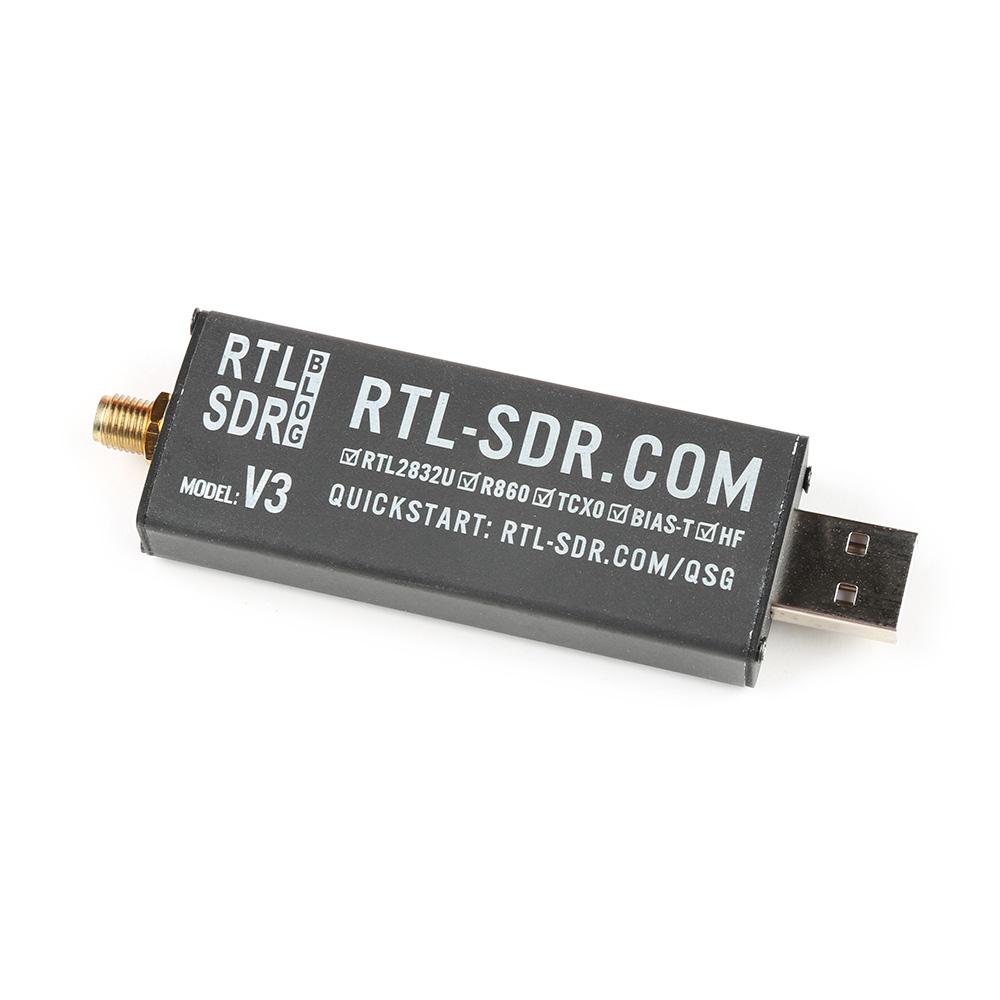
Carbon Computers’ own product description for the Advanced Radio reads, in full: “Advanced Radio (Built in GPS+LoRa - External SDR).” The GPS and LoRa hardware is genuinely built into the module — it is the Base Radio board with SDR routing added. The SDR half of that sentence is explicitly external: the product page’s supporting text refers to accommodating an “external USB SDR dongle,” which settles the onboard-vs-external question this volume opened with. There is no RTL2832U, no R820T2, no Rafael Micro tuner, no ADC soldered to the Advanced Radio board waiting to be characterised. The SDR is whatever USB dongle the owner plugs in.
What the product page does not settle, as of this writing, is whether a dongle ships in the $149 box or whether the $90–100 premium over the Base Radio buys only the USB routing, with the owner supplying their own receiver. Carbon Computers’ listing makes no affirmative “includes an RTL-SDR” claim; a direct inquiry to the vendor ([email protected]), or a close read of the linked DIY Build Guide & BOM PDF and the build video (Volume 1, Section 8), would close that gap before a purchase. Absent that confirmation, the safe planning assumption is that the reader should budget for a separate SDR purchase — an RTL-SDR Blog v3 at roughly $35 is the standard low-cost choice, and it is the hardware this volume uses as its worked example throughout, since it is the dongle most Advanced Radio owners are likely to attach. Likewise unconfirmed is the physical USB routing — whether the module exposes an internal header inside the chassis or an external USB-A port on the rear panel; either is mechanically plausible, and a builder should check it against the build guide before assuming a given dongle’s footprint (many RTL-SDR sticks run 60–70 mm long) will clear the chassis or sit flush against an external port.
8.2.2 Frequency coverage and sensitivity
Because the SDR is bring-your-own, frequency coverage and sensitivity are properties of the dongle, not the PiFlux. The figures below describe the common case — an RTL2832U + R820T2-based dongle (RTL-SDR Blog v3/v4, or an equivalent generic unit) — because that is the receiver most owners will pair with the Advanced Radio’s USB port, not because it is what Carbon Computers ships.
An R820T2 tuner covers roughly 24 MHz to 1.766 GHz directly. Below 24 MHz — the HF bands most relevant to ham radio — a hardware upconverter is required (Section 5.3); some RTL-SDR variants also support direct sampling down to a few hundred kHz, at reduced sensitivity, without one. The RTL2832U’s 8-bit ADC is the meaningful limitation on this class of dongle: roughly 48–50 dB of dynamic range, meaning a strong nearby signal — a local FM broadcast station, a co-located transmitter — will desensitise the front end for weaker signals nearby in frequency. Typical noise figures run 3–8 dB depending on gain and band. None of this is PiFlux-specific; it is the well-documented RTL-SDR profile, reproduced here because it is what a PiFlux Advanced Radio owner will actually experience once a dongle is attached. A HackRF One (Section 6) trades some sensitivity for much wider coverage (1 MHz–6 GHz) and transmit capability at a higher price (roughly $300–350) — a legitimate upgrade path for a reader who outgrows an RTL-SDR’s dynamic range.
8.2.3 The GPS and LoRa complement
The Advanced Radio’s GPS and LoRa hardware is the part of the module that genuinely is onboard — inherited directly from the Base Radio (Volume 5, Sections 2.2 and 2.3 cover both in full). Worth calling out here: the GPS receiver’s 1 pulse-per-second (1PPS) timing output, which many GPS modules expose alongside their NMEA position sentences. A disciplined 1PPS reference is useful for SDR-adjacent timing work that depends on sub-millisecond accuracy — WSPR spot timestamps are validated against a fixed time-slot schedule, and APRS position reports benefit from an accurate system clock when correlating packets against other data. Whether the GPS module exposes 1PPS on a GPIO pin accessible to the Pi 5, or only over the NMEA serial stream, is a detail this volume defers to Volume 5’s fuller GPS treatment.
8.3 Software Stack
8.3.1 Driver layer
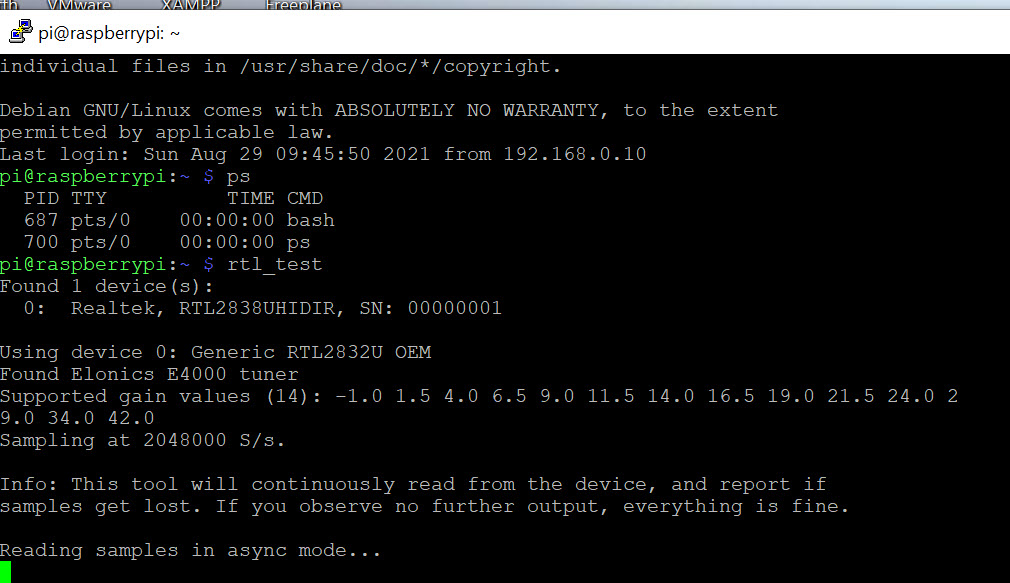
rtl_test confirming the SDR is enumerated — a Realtek RTL2832U device detected on the USB bus. Photo via web search (personal-reference use).Once an RTL-SDR-class dongle is attached to the Advanced Radio’s USB path, Pi OS handles it the same way it would handle any USB RTL-SDR plugged into any Linux box: install the rtl-sdr package (sudo apt install rtl-sdr librtlsdr-dev), which provides the librtlsdr userspace driver and the rtl_test / rtl_sdr / rtl_fm / rtl_power command-line tools. The one gotcha universal to RTL2832U-based dongles is that the Linux kernel’s dvb_usb_rtl28xxu DVB-T driver will often claim the device first, since the same chip was designed as a TV tuner; a udev blacklist rule (blacklist dvb_usb_rtl28xxu in /etc/modprobe.d/) prevents that driver from grabbing the device before librtlsdr can. rtl_test on a correctly configured system reports the tuner (typically “Rafael Micro R820T2 tuner” or similar) and confirms enumeration.
Bandwidth is not a concern at this data rate. The Pi 5’s I/O — including USB — routes through the RP1 southbridge chip introduced in Volume 2, Section 1; RP1 provides two USB 3.0 ports and two USB 2.0 ports independent of the PCIe lane the M.2 Mod uses. An RTL-SDR at its maximum practical 3.2 Msps sample rate, 8-bit I/Q, works out to roughly 3.2 M × 2 bytes ≈ 6.4 MB/s, or about 51 Mbit/s — comfortably inside USB 2.0’s 480 Mbit/s ceiling with headroom to spare, whichever of RP1’s USB generations the dongle happens to land on. A HackRF One at its full 20 Msps rate is a different story: at roughly 40 MB/s it saturates a USB 2.0 link and wants the RP1’s USB 3.0 path to run without dropped samples, which is a reasonable expectation on the Pi 5’s I/O but not something this volume has bench-verified on a PiFlux specifically.
8.3.2 SDR receivers: GQRX and SDR++
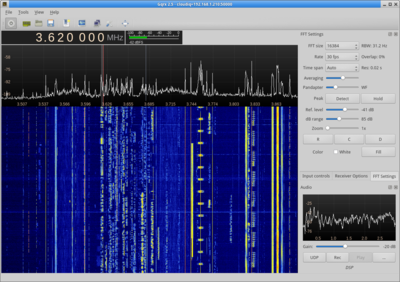
GQRX is the longest-standing SDR GUI on Linux and installs directly from Pi OS’s repositories: sudo apt install gqrx-sdr. First launch presents a device-selection dialog; an attached RTL-SDR appears as rtl=0. The interface splits into a spectrum-plus-waterfall display on top and tuning and demodulation controls to the side — WFM and WFM-stereo for broadcast FM, NFM for narrowband voice (ham 2 m/70 cm, GMRS, FRS), AM for aircraft band and shortwave broadcast, and SSB/CW for ham HF voice and Morse once an upconverter is in the chain. The PiFlux’s 1920×720 display gives the waterfall meaningfully more horizontal room than a standard 4:3 or 16:9 panel at the same diagonal size — a genuine, if modest, ergonomic advantage for a display this compact.
SDR++ is the more recently developed alternative — a modular, plugin-based GUI with a more actively developed feature set than GQRX, though without an apt package on Pi OS as of this writing; it requires a build from source (cmake, libfftw3-dev, libglfw3-dev, librtlsdr-dev, and related SoapySDR/HackRF/Airspy development packages, followed by the standard cmake / make / make install sequence) or a pre-built AppImage. On Dragon OS — the SDR-focused Ubuntu remix some PiFlux owners may reach for as an alternate OS card (Volume 7 covers OS options broadly) — SDR++ ships pre-installed. Either receiver is light enough on the Pi 5’s Cortex-A76 cores to run comfortably at RTL-SDR sample rates (2.4 Msps); CPU load becomes a real consideration only once GNU Radio flowgraphs with heavier per-sample processing enter the picture, which Section 3.3 addresses.
8.3.3 GNU Radio on ARM
GNU Radio — the signal-processing framework underlying GQRX, SDR++, and most other Linux SDR tools — installs from Pi OS’s repositories as well (sudo apt install gnuradio gnuradio-dev gr-osmosdr, the last package providing the RTL-SDR and HackRF source blocks GNU Radio flowgraphs need). gnuradio-companion is the graphical flowgraph editor; a typical FM-broadcast demodulation flowgraph (RTL-SDR source, decimating resampler, WBFM receive block, audio sink) is a five-minute build for anyone who has used it before.
Realistic flowgraph complexity on the Pi 5’s Cortex-A76 cores comfortably covers the single-channel decode workloads this volume’s use cases lean on — AM/FM demodulation, an ADS-B decoder chain, or an APRS AFSK decode — all of which land well under full CPU load at RTL-SDR sample rates. Where the Pi 5 starts to work for its living is wider-bandwidth flowgraphs: a HackRF source at or near its full 20 Msps rate, decimated down with FIR filtering, or a multi-channel decode running concurrently, will push CPU utilisation high enough to interact with the thermal management Volume 4 covers — sustained high load on the Cortex-A76 cores is exactly the scenario the Active Cooling System add-on exists to extend. For light single-channel work, passive cooling is adequate; for a demanding wideband flowgraph run continuously in the field, the thermal margin Volume 4 quantifies is the relevant reference.
8.3.4 Decoders and protocol tools
A handful of purpose-built decoders cover most of the field use cases in Section 5, and all are either in Pi OS’s apt repositories or a short build from source away. dump1090-fa (the FlightAware fork) or dump1090-mutability decode ADS-B at 1090 MHz and serve a web map on port 8080. rtl-ais, or the rtl_fm plus aisdecoder pipeline, decode AIS marine traffic on the paired 161.975/162.025 MHz channels. multimon-ng handles a grab-bag of narrowband digital protocols — APRS, POCSAG paging, FLEX, ATIS — from an audio stream. rtl_433 decodes the ISM-band chatter of consumer sensors and remotes at 433/915 MHz. wsjt-x handles FT8 and WSPR, but only once an HF upconverter is in the signal chain (Section 5.3), since those modes live below the R820T2’s native tuning floor. Most of these install via apt; a few (multimon-ng, rtl-ais) are more reliably built from their GitHub sources on Pi OS, a straightforward git clone plus make in each case.
8.3.5 APRS and digital voice: Direwolf
Direwolf is the standard software TNC (terminal node controller) for decoding APRS on Linux, and it is the piece that turns a bare SDR receiver into a working APRS station without any dedicated hardware TNC. The pattern is to tune GQRX (or rtl_fm for a lighter-weight, GUI-less alternative) to the local APRS frequency — 144.390 MHz in North America — in narrow FM mode (APRS’s AFSK signal uses 5 kHz deviation), and pipe the demodulated audio into Direwolf’s adevice input; Direwolf decodes the AX.25 frames and prints them to the terminal, or hands them to a client like YAAC or Xastir for a mapped station display. For headless or CPU-conscious operation, rtl_fm piped directly into Direwolf’s adevice stdin mode skips the overhead of a full GUI SDR application.
The regulatory point worth stating plainly: everything in this chain is receive-only on the PiFlux’s stock SDR path. Retransmitting APRS packets received via SDR would require a licensed transmitter — something the PiFlux, in its stock Advanced Radio configuration, does not have. The LoRa module is a separate radio operating outside Part 97 entirely, under Part 15 ISM-band rules; it has no bearing on the SDR receive chain’s regulatory status.
8.4 Antenna Options for the PiFlux Form Factor
8.4.1 The antenna interface on the chassis
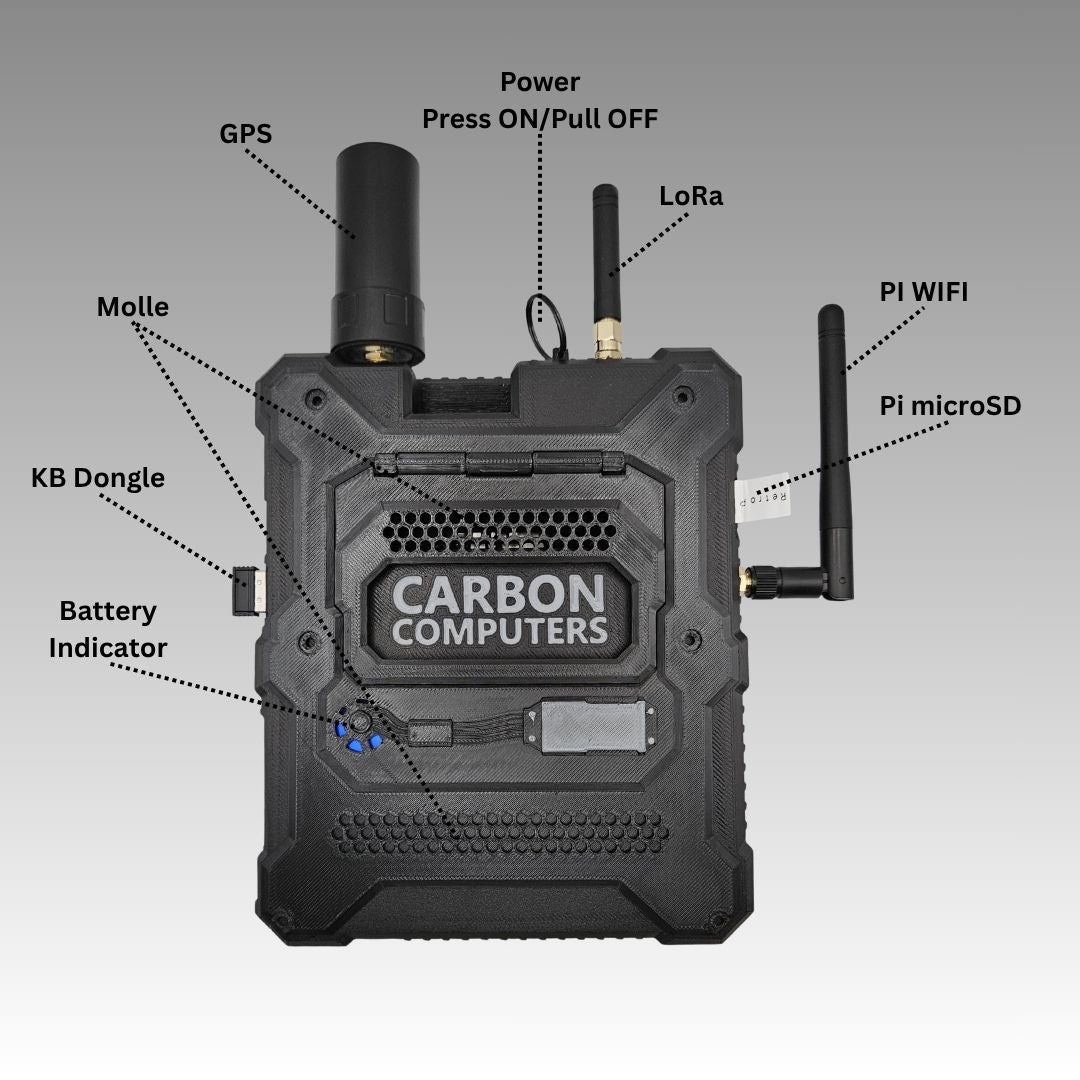
Because the SDR is an external USB dongle rather than a component built into the Advanced Radio board, the PiFlux chassis does not appear to expose a dedicated SDR antenna connector the way it exposes GPS and LoRa antenna mounts (visible along the top edge once the radio add-ons are fitted). The antenna interface for SDR work is, instead, whatever connector the dongle itself carries — for the common RTL-SDR case, an SMA-female jack on the dongle’s own housing. Carbon Computers’ documentation does not specify whether the Advanced Radio’s USB routing brings the dongle fully inside the chassis (in which case an SMA pigtail routed out through a port or aperture reaches an external antenna) or terminates at an external port where the dongle sits outside the case with its own stub antenna. Either is mechanically reasonable for a compact all-in-one deck; confirming which one is in play is worth doing against the build video or DIY Build Guide before planning an antenna around it.
8.4.2 Portable antenna options by band
Whichever routing the Advanced Radio uses, the antenna choice itself follows the same logic as any portable RTL-SDR setup. A quarter-wave monopole sized to a given frequency is the simplest reference point: at 1090 MHz (ADS-B) that works out to roughly 68 mm — small enough to be a practical rigid stub on a bag-carried device. At 433 MHz (ISM band) it is closer to 170 mm, still reasonable as a telescoping or fixed whip. At 144 MHz (2 m, APRS) the quarter-wave figure balloons to roughly 500 mm, which is impractical as a rigid stub on a device meant to travel in a bag or pocket; a telescoping whip that collapses for transport and extends for use, or a folded/rubber-duck design accepting reduced efficiency for compactness, is the realistic choice. As a general-purpose compromise, a telescoping whip covering roughly 100 MHz to 1 GHz is a sensible single antenna for the PiFlux owner who wants one item that handles aircraft, marine, and most ham VHF/UHF use cases adequately without carrying a separate antenna per band.
HF work is a different proposition entirely: with an upconverter in the chain (Section 5.3), the antenna becomes a longwire or a small magnetic loop, both of which are viable at a stationary field setup but awkward to consider “portable” in the sense the rest of this device’s use cases assume. HF SDR work with the PiFlux is realistically a fixed-station activity — set up at a campsite or a field day location — rather than a walk-around one.
8.4.3 Regulatory context (Part 97 / receive-only)
For the Amateur Extra-licensed reader this volume assumes, the regulatory picture is short and complete. Receiving is not licensed activity under U.S. law — the SDR path on the PiFlux, in any configuration, requires no license to operate as a receiver, whether tuned to amateur bands, aircraft band, marine VHF, or broadcast FM. The LoRa module operates under Part 15’s ISM-band license-exempt provisions, entirely separate from Part 97. No transmit capability exists on the SDR side of the stock PiFlux configuration in any circumstance; a transmitter would need to be separately sourced, type-accepted, and operated under the license class appropriate to the band in question. That is the entire regulatory statement this volume needs to make — the reader’s existing Part 97 knowledge covers everything else.
8.5 Representative Field Use Cases
8.5.1 ADS-B aircraft tracking
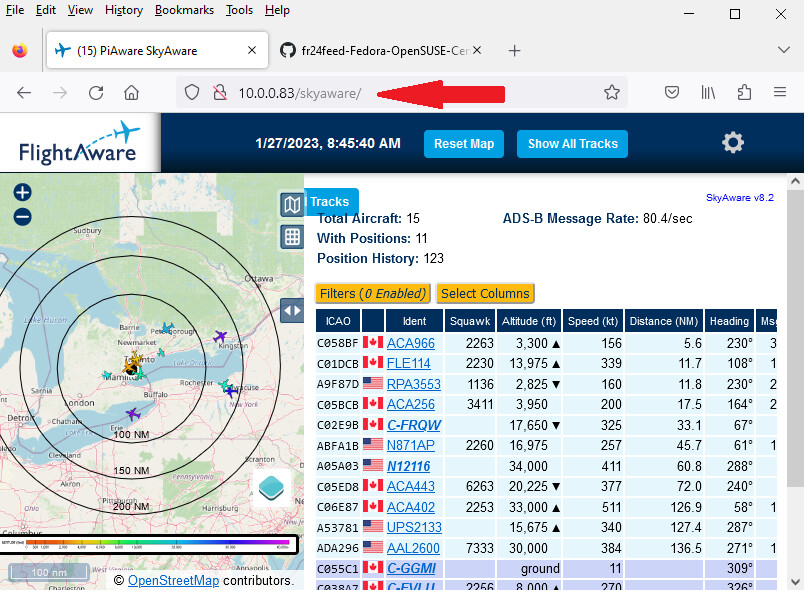
ADS-B at 1090 MHz is the easiest entry point into SDR on the PiFlux, and a reasonable first thing to try once a dongle is attached to the Advanced Radio’s USB path. dump1090-fa or dump1090-mutability, run with the --net flag, serves a web interface on port 8080 showing tracked aircraft with position, altitude, heading, and callsign where available. A simple quarter-wave monopole at 1090 MHz (Section 4.2) delivers on the order of 100–200 nautical miles of coverage in unobstructed conditions — a genuinely large radius for a receive-only, license-free signal that transmits continuously and decodes losslessly, which is part of why it is the canonical first SDR project for newcomers.
8.5.2 APRS receive and decoding
APRS receive follows the Direwolf pattern from Section 3.5: GQRX (or the lighter rtl_fm) tuned to 144.390 MHz in North America, narrow FM demodulation, audio piped to Direwolf, decoded packets shown in a terminal or a mapping client such as YAAC or Xastir. This is a useful complement to the LoRa side of the Advanced Radio module — LoRa handles the PiFlux’s own off-grid mesh messaging, while the SDR path lets the same device passively monitor the amateur APRS network running on conventional VHF packet radio, entirely independent of the LoRa mesh.
8.5.3 HF receive with an upconverter
Getting below the R820T2 tuner’s roughly 24 MHz floor requires a hardware upconverter — a Ham It Up or SpyVerter are the common choices — which shifts the 0–30 MHz HF range up into the RTL-SDR’s native tuning window before the dongle ever sees it. The upconverter sits between the antenna (a longwire or end-fed halfwave, per Section 4.2) and the dongle’s SMA input; GQRX or SDR++ is configured with a frequency offset matching the upconverter’s local-oscillator injection so displayed frequencies read correctly. Receive-only HF SWL work needs no license. The bands most rewarding for casual monitoring are 40 m (7 MHz — FT8 and SSB traffic), 20 m (14 MHz — the primary HF DX band), and 80 m (3.5 MHz — regional nighttime propagation).
8.5.4 Signal hunting and spectrum survey
Used as a portable spectrum analyser across the roughly 24 MHz–1.7 GHz range a typical RTL-SDR covers, the PiFlux and SDR++ (or GQRX) combination is a capable band-survey tool. rtl_power handles long-duration sweeps, writing a CSV of power versus frequency versus time that heatmap.py renders into a visual waterfall spanning hours or days — useful for characterising what occupies a given ISM band (433 MHz, 902–928 MHz, 2400–2483 MHz are the common ones) at a given location, or for hunting down an intermittent or unknown transmitter. This is the use case that most rewards a wideband antenna over a narrowly tuned one, since the point is coverage breadth rather than peak sensitivity at a single frequency.
8.5.5 AIS marine traffic receive
AIS — the automatic identification system ships use to broadcast position — runs on two adjacent VHF marine channels, 161.975 and 162.025 MHz. rtl-ais is the single-tool option, combining the rtl_fm demodulation step with AIS-specific decoding in one utility; the aisdecoder plus rtl_fm pipeline is the equivalent two-piece alternative. A VHF marine-band whip — a quarter-wave at 162 MHz works out to roughly 462 mm — is adequate for harbour-level coverage; OpenCPN renders decoded AIS targets as an overlay on a nautical chart. Range is line-of-sight limited at VHF, so a ground-level PiFlux realistically sees vessels out to 5–10 nautical miles rather than the much longer ranges achievable from an elevated coastal receive site.
8.6 SDR Comparison: PiFlux vs. Clockwork uConsole
8.6.1 uConsole SDR story
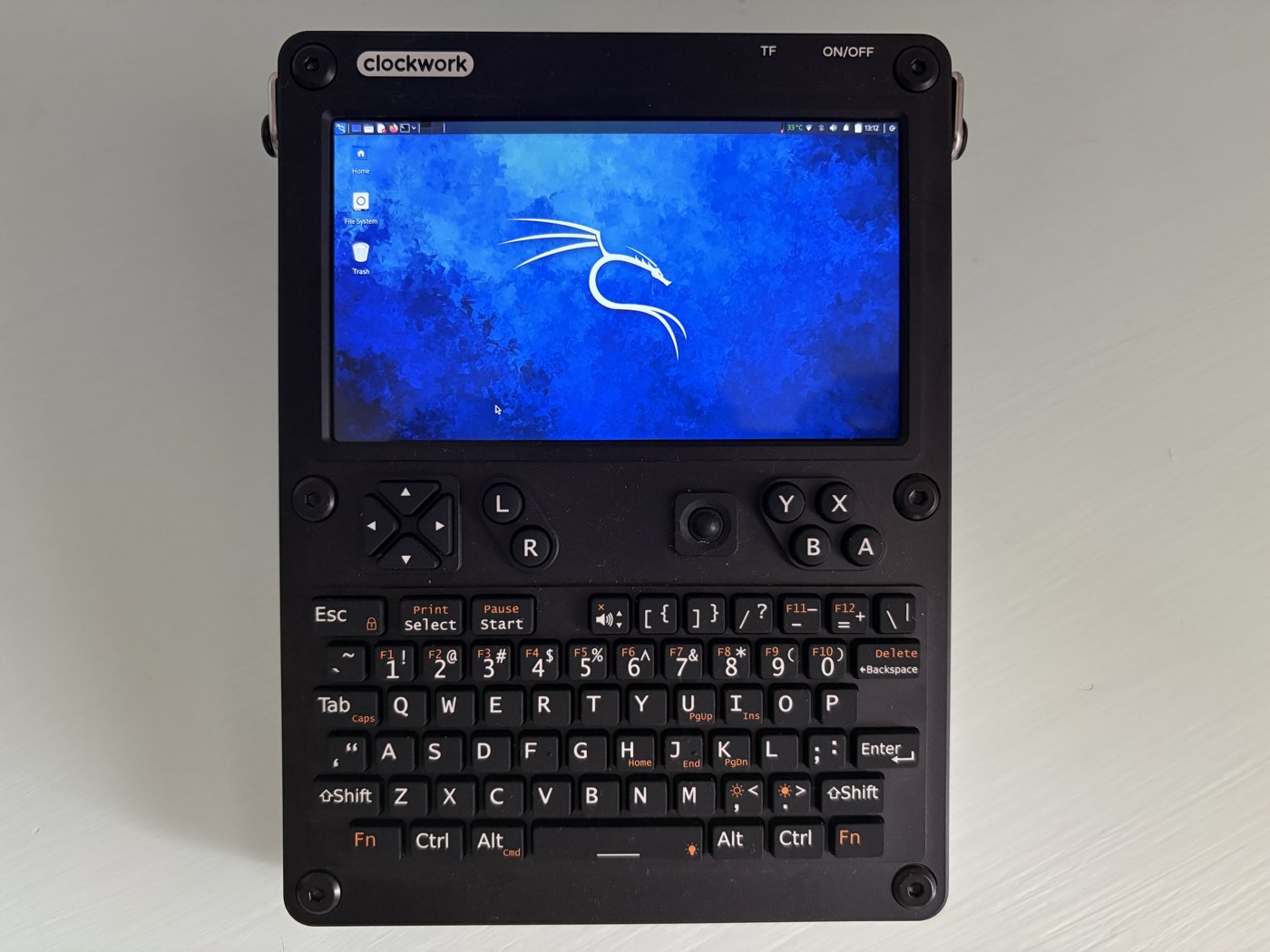
The Clockwork uConsole’s own deep-dive (../../Clockwork uConsole/) is the authoritative source for its SDR story; the shape of it is instructive here. The stock uConsole kit has no SDR built in — a plain USB RTL-SDR or HackRF plugged into its USB-A port, or via an OTG adapter on USB-C, is the baseline path, identical in spirit to plugging a dongle into the PiFlux’s Advanced Radio USB interface. Its Mini PCIe expansion slot is where the story gets more interesting: the community HackerGadgets “AIO V2” daughtercard combines an onboard RTL2832U/R820T2 SDR (functionally equivalent to an RTL-SDR Blog v3, with its own TCXO and bias-tee output), a GPS receiver, and a LoRa SX1262 transceiver on one card — the same GPS-plus-LoRa-plus-SDR bundle the Advanced Radio offers, but as a third-party board for a Mini PCIe slot rather than a first-party module. The uConsole also has a 4G LTE Mini PCIe option for cellular backhaul, a use case the PiFlux’s add-on catalog does not address.
The precise comparison: both base kits are SDR-agnostic until an add-on or a plain dongle is attached. Where they diverge is the enthusiast ecosystem once the reader wants more integration — the AIO V2’s onboard RTL-SDR chip is a step beyond the PiFlux Advanced Radio’s external-dongle-only design, at least based on what Carbon Computers documents, though whether that gap matters in practice depends on whether the Advanced Radio in fact bundles a dongle, which Section 2.1 could not confirm.
8.6.2 Integration model and compute comparison
At the point of use, both devices end up with a USB-connected receiver running the same Linux stack — librtlsdr, GQRX, SDR++, GNU Radio — and the same decoders. The PiFlux’s larger 574 g chassis and dedicated radio bay give more room to route cabling; the uConsole’s pocket-class form factor is more portable but concentrates everything into a tighter volume, with its Mini PCIe slot (rather than a first-party radio bay) as the attachment point for AIO V2-class integration. Neither device’s SDR antenna is chassis-native in the plain-dongle case — both route to whatever connector the dongle provides.
On compute, the PiFlux runs a Pi 5 across all RAM tiers — quad Cortex-A76 at up to 2.4 GHz, 2–16 GB LPDDR4X (Volume 2). The uConsole’s compute path is swappable: the original CM4 (quad Cortex-A72, 1.5 GHz) is meaningfully slower for SDR work, while its CM5 option — the same BCM2712 silicon as the PiFlux — closes that gap, and the Radxa RK3588S2 path (with an NPU) is faster still. A PiFlux against a CM5-equipped uConsole is essentially the same compute story; against the more common CM4 kit, the PiFlux is meaningfully faster for demanding flowgraphs. Battery capacity favours the PiFlux for sustained sessions — its 10,000 mAh internal cell against the uConsole’s two-cell 18650 tray — with runtimes (3–5 h vs. roughly 2–4 h active) in the same broad range.
8.6.3 Decision: which platform for which SDR user
For a display large enough for comfortable waterfall work (1920×720 vs. the uConsole’s 1280×720), NVMe storage via the M.2 Mod for long IQ-recording sessions, and the larger battery, the PiFlux with Advanced Radio is the better-suited platform — with the caveat that a buyer should confirm what actually ships in the Advanced Radio box and how its USB routing works before committing to it. For absolute portability, the uConsole’s existing Mini PCIe ecosystem (AIO V2’s tighter onboard-SDR-plus-GPS-plus-LoRa integration, or the 4G LTE option), the uConsole is the better fit. At the software level the two platforms are not meaningfully differentiated — the choice comes down to form factor, battery runtime, and how much the reader values a first-party radio bay versus a third-party expansion-card ecosystem.
8.7 Resources
Table 1 — 7. Resources
| Resource | URL |
|---|---|
| PiFlux product page (Carbon Computers) | https://carboncomputers.us/products/pi-flux |
| RTL-SDR drivers and software | https://www.rtl-sdr.com/rtl-sdr-quick-start-guide/ |
| GQRX SDR receiver | https://www.gqrx.dk/ |
| SDR++ | https://www.sdrpp.org/ |
| GNU Radio | https://www.gnuradio.org/ |
| Direwolf (APRS software TNC) | https://github.com/wb2osz/direwolf |
| dump1090-fa (ADS-B) | https://github.com/flightaware/dump1090 |
| rtl-ais (AIS decoder) | https://github.com/dgiardini/rtl-ais |
| rtl_433 (ISM sensor decoder) | https://github.com/merbanan/rtl_433 |
| uConsole deep-dive (SDR + radio) | ../../Clockwork uConsole/ |
| Vol 2 — Choosing the Pi 5 (RP1, USB, PCIe) | ../../PiFlux/02-inputs/volume_sources/vol2.md |
| Vol 5 — Add-On Catalog (Advanced Radio) | ../../PiFlux/02-inputs/volume_sources/vol5.md |
| Vol 4 — Power & Thermal (SDR CPU load) | ../../PiFlux/02-inputs/volume_sources/vol4.md |
| Vol 7 — OS Options & Multiboot (SDR driver matrix) | ../../PiFlux/02-inputs/volume_sources/vol7.md |
Comments (0)