PiFlux · Volume 2
Choosing the Pi 5
2/4/8/16 GB RAM tradeoffs for the PiFlux workload, the PCIe→M.2 capability, and what to buy
2.1 The Pi 5 Platform in the PiFlux Context
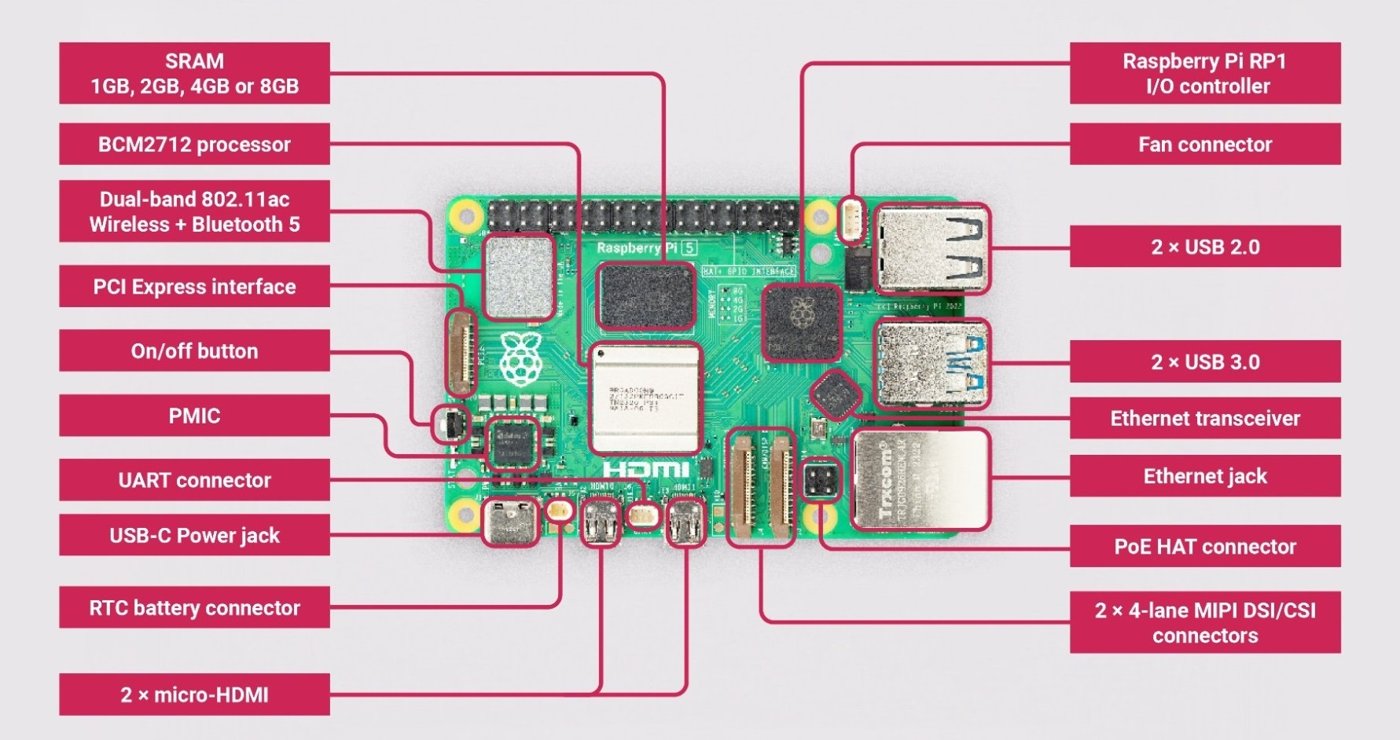
Every PiFlux configuration — Barebones or Complete, at any RAM tier — is built around a genuine Raspberry Pi 5 board, not a Pi-compatible clone or a proprietary carrier design. Carbon Computers’ chassis is engineered specifically around the Pi 5’s HAT+ mechanical standard and connector layout, which is also why the platform-depth material for this compute board lives in this PiFlux series rather than being duplicated in the sibling DFCD deep-dive (../../DFCD/): the two products share the identical Pi 5 hardware story, and DFCD’s own Volume 2 explicitly defers here for it.
At the center of the board is Broadcom’s BCM2712 system-on-chip: a quad-core Arm Cortex-A76 CPU clocked at 2.4 GHz, backed by per-core L2 cache and a shared L3 — roughly double the single-thread throughput of the Pi 4’s Cortex-A72 cores at the same core count, and the main reason the Pi 5 supports the kind of Linux desktop and SDR workloads this series covers. The GPU is a VideoCore VII core supporting OpenGL ES 3.1 and Vulkan 1.3 (confirmed against Raspberry Pi’s own Pi 5 specification page), with a 4Kp60 HEVC hardware decoder — adequate for a lightweight desktop compositor and video playback, but not a target for GPU-compute workloads.
Two other blocks matter for how the PiFlux actually uses the board. The RP1 I/O controller is Raspberry Pi’s own in-house silicon — a companion chip, linked to the BCM2712 internally, that handles USB 2.0/3.0, Gigabit Ethernet, the camera/display interfaces, and general-purpose I/O. RP1 is what gives the Pi 5 meaningfully faster USB 3.0 throughput than the Pi 4 and is largely invisible to the PiFlux builder day to day, but it shares the board’s thermal budget with the CPU and GPU — a fact Volume 4 carries into the power and cooling analysis.
The second block is the one this volume is organized around: a PCIe 2.0 ×1 interface, exposed via a flat flex-cable connector next to the USB ports, with no equivalent on the Pi 4. That interface is the reason the PiFlux’s M.2 Mod (Section 4, and Volume 3 in full) exists at all — the Pi 5 is the first mainline Raspberry Pi board built to support NVMe storage without an intermediary conversion board, and it is why the PiFlux is designed around this specific Pi generation rather than an earlier one (Section 3.2).
RAM is the other axis a buyer chooses. Carbon Computers offers the Pi 5 in the same 2 GB / 4 GB / 8 GB / 16 GB LPDDR4X tiers Raspberry Pi itself sells as board configurations, and the right choice depends on which of the PiFlux’s actual field workloads — terminal use, a light desktop, general Linux, or an SDR pipeline — the buyer intends to run. Section 2 works through each tier against those workloads.
2.2 RAM Tier Comparison
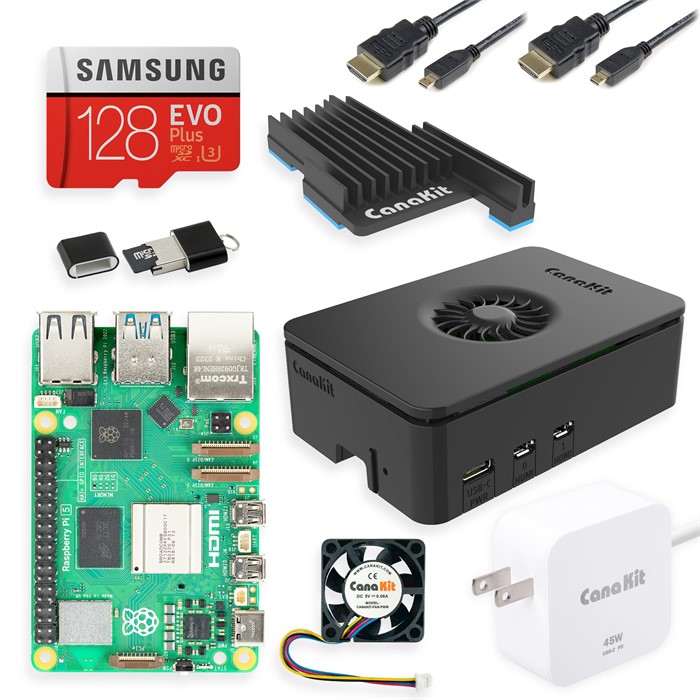
Raspberry Pi ships the Pi 5 board in five RAM configurations — 1 GB, 2 GB, 4 GB, 8 GB, and 16 GB, all LPDDR4X — of which Carbon Computers packages four into the PiFlux: 2, 4, 8, and 16 GB. (The 1 GB SKU, a low-cost addition to the Pi 5 line introduced after the PiFlux’s original configuration set, is not offered by Carbon Computers.) At each tier, the RAM ceiling interacts with two things that matter for how the PiFlux gets used in the field: the baseline memory footprint of whichever OS the buyer boots (Raspberry Pi OS, Ubuntu, Kali, Parrot Security, Twister OS, or Batocera — Volume 7 walks all six), and the headroom left over for the actual workload once that OS is resident.
Table 1 — 2. RAM Tier Comparison
| RAM tier | Realistic ceiling for | Headroom after OS idle* |
|---|---|---|
| 2 GB | Single terminal session, lightweight scripting | Thin — a graphical desktop leaves only low hundreds of MB free |
| 4 GB | One GUI application plus background services | Workable, but tight under any second concurrent application |
| 8 GB | Multiple concurrent apps, browser, moderate SDR chain | Comfortable general-purpose margin |
| 16 GB | Large in-memory datasets, heavy SDR/DSP, always-on server | Ample — the tier for deliberate headroom, not daily necessity |
*Idle footprint varies by OS image and desktop environment; the figures above are per-tier characterizations, not fixed benchmark numbers.
2.2.1 2 GB — minimum viable
The 2 GB tier is the PiFlux’s floor, not its default. It suits a genuinely narrow set of workloads well: a single SSH or local terminal session, a text editor, basic Python or shell scripting, and lightweight command-line tools — the kind of use where the Pi 5 functions as a portable terminal rather than a graphical workstation. A minimal Raspberry Pi OS install without a desktop environment idles in the low hundreds of megabytes, leaving most of the 2 GB free for this class of task.
The tier gets tight fast once a graphical desktop enters the picture. Raspberry Pi OS with its default desktop, or a full Ubuntu ARM64 desktop image, commonly idles well up into the hundreds of megabytes before any application is opened — figures that move with OS point releases and desktop environment choice, so treat this as an order-of-magnitude guide rather than a fixed number. Layer a browser or a second concurrent application over that idle floor and 2 GB is exhausted or swapping, and the PiFlux’s default microSD-only configuration makes swapping to disk a last resort rather than a comfortable fallback. Batocera — the retro-gaming-oriented OS in the PiFlux’s supported list — is the one graphical workload that fits comfortably at 2 GB, since it is built to run on hardware far more constrained than a Pi 5. For any other graphical or multi-application use, 2 GB is a budget-constrained choice rather than a general-purpose one.
2.2.2 4 GB — light desktop
4 GB is a genuine step up: enough for one GUI application at a time, comfortably, alongside the background services a field Linux box typically keeps running underneath it — an SSH daemon, cron, log forwarding or syncing, network management. A single browser tab, a PDF viewer, or a terminal-heavy IDE session all fit without contention at this tier.
Where 4 GB runs out of room is exactly where the PiFlux’s more interesting workloads start: an SDR-adjacent pipeline running GQRX or a GNU Radio flowgraph alongside a desktop session leaves little margin, since decode and DSP processes compete with the desktop’s own footprint for the same 4 GB ceiling. A buyer who wants a light, single-application desktop and does not expect to run SDR work concurrently is well served here; a buyer who already knows radio work is the goal should look to 8 GB (2.3) instead.
On price, the 4 GB Complete unit is $549 against a $299 Barebones Kit. Section 5 works the full Barebones-vs-Complete math per tier, but the short version at 4 GB: sourcing a 4 GB Pi 5 board separately and pairing it with the Barebones Kit lands close enough to the Complete price that the decision mostly comes down to whether the buyer wants to skip the assembly step, not whether it saves meaningful money.
2.2.3 8 GB — comfortable general use
8 GB is the general recommendation for a PiFlux buyer who has not already narrowed to a specific workload. It is comfortable running several concurrent applications, a browser with a realistic number of tabs, and a moderate SDR pipeline (GQRX or SDR++ receiving and decoding a single signal chain) at the same time — without the tight margins that make 2 GB and 4 GB workable only for their specific narrow use cases.
The Complete 8 GB unit ships with a 64 GB microSD card as bundled storage — noticeably more than the 32 GB bundled at the 2 GB and 4 GB tiers. Whether 64 GB of microSD is enough, or whether the M.2 Mod (Section 4) becomes attractive at this tier, depends less on capacity than on I/O pattern: microSD’s sequential and random-access ceiling is the real bottleneck for tasks like large SDR capture files, multiboot OS swapping across several cards, or sustained logging — not the 64 GB figure itself. A buyer running one OS with modest file needs will find 64 GB adequate for a long time; a buyer running multiboot, heavy captures, or wanting to boot the OS itself from faster storage should read Section 4 and Volume 3 before assuming the SD card is sufficient.
2.2.4 16 GB — heavy workloads and SDR pipelines
16 GB earns its place for three overlapping use cases: keeping a large dataset (a sizeable log or capture archive, a substantial GIS layer, a large codebase) resident in memory rather than paged from storage; running an aggressive SDR signal chain — a GNU Radio flowgraph with several concurrent DSP blocks, wideband capture buffers, or more than one receive chain active at once — where headroom keeps the flowgraph itself from becoming memory-constrained; and using the PiFlux as an always-on server or monitoring node, where multiple services stay resident indefinitely rather than one application running at a time.
The Complete 16 GB unit is priced at $849 — a $200 step over the 8 GB Complete unit’s $649, confirmed current pricing on the Carbon Computers product page, and the 16 GB configuration is presently listed and orderable, not an announced-but-unshipped tier. Whether that $200 step is warranted for a realistic PiFlux field use case is a genuine judgment call: for the terminal, light-desktop, and general-8-GB-comfortable workloads in 2.1–2.3, it is not — those workloads simply don’t reach 16 GB’s ceiling. For the heavy-SDR or always-on-server case above, the premium buys real, usable headroom rather than a marketing number, and is the more defensible spend. A buyer uncertain which camp they’re in should default to 8 GB and treat 16 GB as a deliberate choice for a known heavy workload rather than a default upgrade.
2.3 Why the Pi 5: PCIe and M.2 Viability
2.3.1 The PCIe 2.0 lane and the HAT+ connector
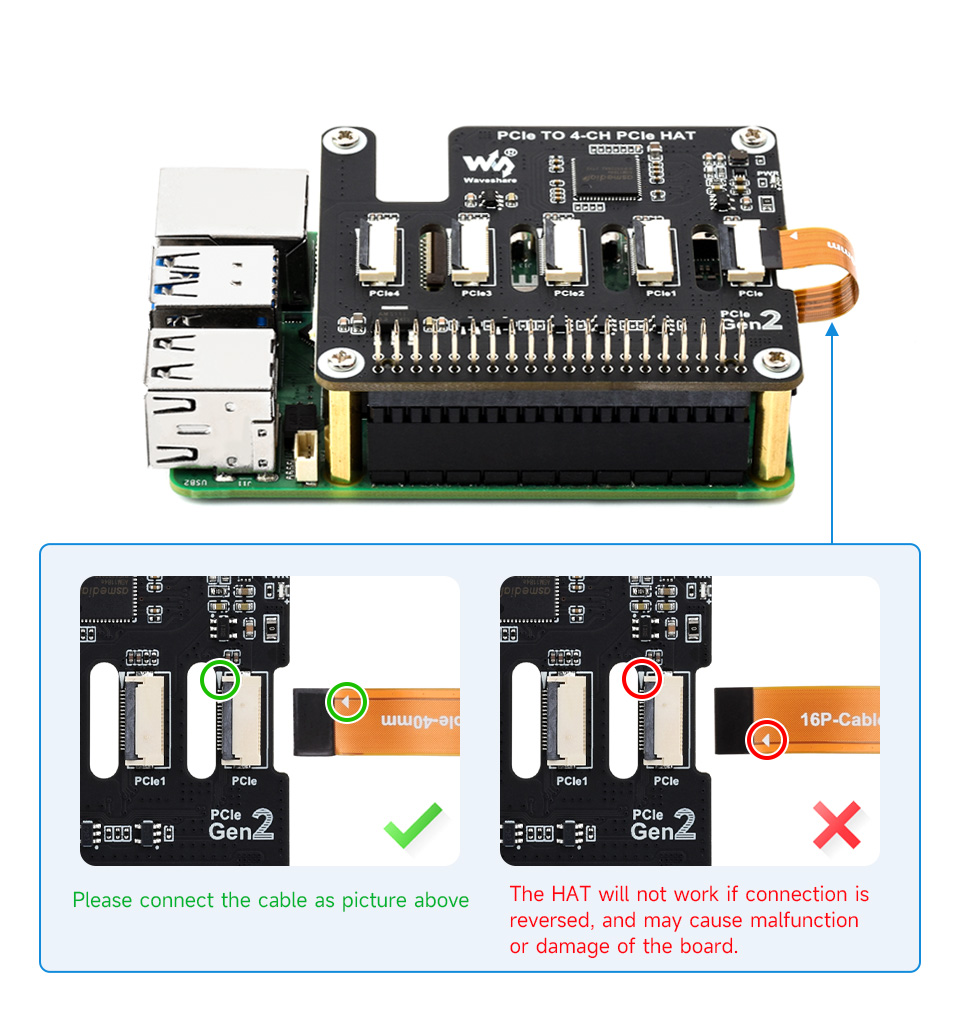
The detail that actually distinguishes the Pi 5 from every earlier Raspberry Pi board, more than the CPU or GPU generation, is a PCIe 2.0 ×1 interface — confirmed on Raspberry Pi’s own Pi 5 specification page as a “PCIe 2.0 x1 interface for fast peripherals” — exposed through a flat flex-cable connector on the board edge next to the USB ports. This is the connector the PiFlux’s M.2 Mod hangs off, via a HAT+-form-factor adapter board and its own flex cable running back to the Pi 5.
PCIe 2.0 running a single lane (×1) at its standard 5 GT/s signaling rate, with 8b/10b line encoding, works out to a theoretical ceiling around 500 MB/s; real-world throughput after protocol overhead (transaction-layer packet headers, flow control) is realistically closer to 400 MB/s for sustained transfers. This is a computed figure from the PCIe 2.0 specification’s known signaling rate, not a PiFlux- or Pi-5-specific benchmark — actual NVMe throughput over this interface will also depend on the specific drive and adapter. Set that number against microSD: even a fast UHS-I card in SDR104 mode (which the Pi 5’s SD controller supports) typically delivers sequential throughput well under half of what the PCIe lane can sustain, and random-access I/O — the pattern that actually governs OS boot time, package installs, and everyday responsiveness — is where microSD falls furthest behind NVMe.
That gap is the entire technical justification for the M.2 Mod: it is less a storage-capacity upgrade than an I/O-performance upgrade, trading microSD’s electrical and mechanical ceiling for the PCIe lane’s substantially higher one. Section 4 covers what the M.2-capable PiFlux configuration looks like as a purchase; NVMe drive selection, form factor (2230 vs. 2242), and the boot-from-NVMe configuration procedure are Volume 3’s full scope and are not repeated here.
2.3.2 Why no earlier Pi is the right base
The PiFlux’s M.2 Mod is designed specifically around the Pi 5’s HAT+ PCIe interface, and no earlier Raspberry Pi board provides an equivalent connection point. The Pi 4 has no user-exposed PCIe lane at all — its internal PCIe link feeds the USB 3.0 controller and never surfaces as a connector a HAT can use. The Compute Module 4 (CM4) does expose PCIe, and third-party M.2 HATs exist for it, but the CM4 is a SODIMM-form-factor module that requires its own carrier board — a completely different mechanical and chassis design from the PiFlux’s Pi-5-in-a-clamshell layout, not a drop-in alternative. The Pi Zero family has no PCIe interface and a physically incompatible board outline regardless.
The practical conclusion: the Pi 5 is not an arbitrary or interchangeable choice for the PiFlux — it is the first, and at the time of writing the only, mainline Raspberry Pi board whose PCIe interface and HAT+ connector layout the M.2 Mod, and by extension the PiFlux’s whole chassis and add-on ecosystem, is built around. A buyer weighing whether an older, possibly cheaper Pi board could substitute in a PiFlux should treat that as a non-option rather than a cost-saving path.
2.4 The M.2-Capable Configuration
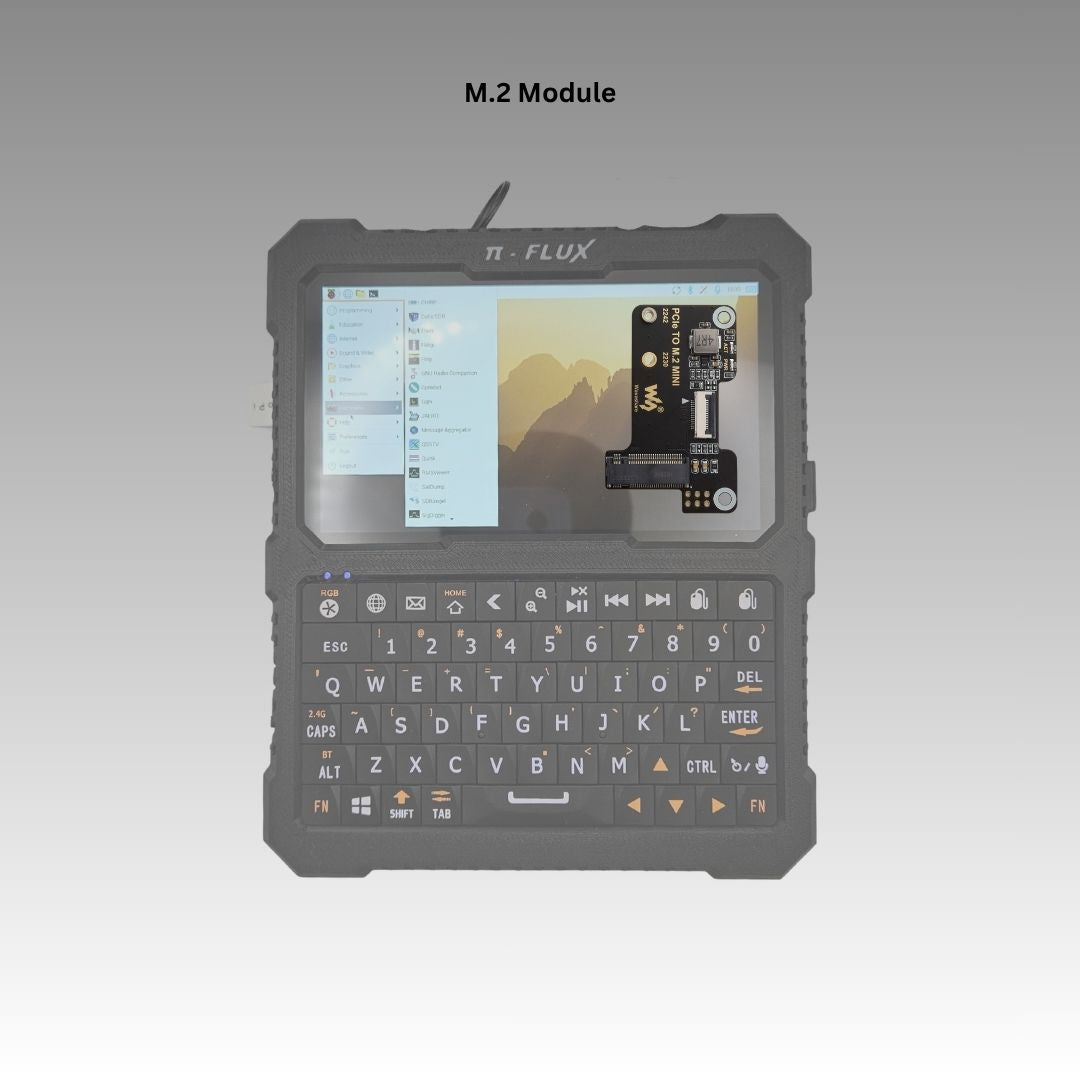
Any PiFlux RAM tier — 2, 4, 8, or 16 GB — can be paired with the M.2 Mod; the $59 add-on price is flat across all four configurations, per the Carbon Computers product page, so the M.2 decision and the RAM-tier decision are independent purchases rather than a bundled tier. The Mod itself is a PCIe-to-M.2 adapter board that occupies the Pi 5’s FFC/HAT+ connector (Section 3.1) and presents a physical M.2 Key M socket sized for the 2230 or 2242 form factors — the compact NVMe drives that fit inside the PiFlux’s chassis envelope (the longer 2280 form factor common in laptops does not fit here).
Deciding whether to add the M.2 Mod is really a question of I/O pattern rather than RAM tier: a buyer who wants a fast-booting OS, a multiboot setup with several full OS images resident at once, or a sustained-write workload like SDR capture logging benefits from M.2 regardless of which RAM tier they’ve chosen; a buyer running a single lightweight OS off the bundled microSD, with no multiboot or capture-heavy use case, may reasonably skip it. Section 5’s purchase recommendations flag where M.2 is worth adding per reader profile; NVMe drive selection (endurance, capacity, form factor) and the boot-from-NVMe configuration steps are Volume 3’s full scope.
2.5 What to Buy
The purchase decision for a PiFlux buyer breaks down along two largely independent axes covered in this volume — which RAM tier (Section 2), and whether to add the M.2 Mod (Section 4) — plus a third: whether to buy the Complete unit or the Barebones Kit and source a Pi 5 separately.
Terminal-only field use. The 2 GB Complete unit at $449 is the right entry point — the terminal and light-scripting workloads in Section 2.1 do not benefit from a higher tier, and the Complete path avoids any assembly step for a buyer who wants a working field terminal out of the box.
General Linux desktop. The 8 GB Complete unit at $649 is the default recommendation from Section 2.3 — comfortable headroom for concurrent desktop applications without paying the 16 GB tier’s premium for capacity this workload doesn’t use.
SDR and radio operator. 8 GB is the floor for a moderate single-chain SDR workload; 16 GB is worth the step up for a heavier flowgraph or multiple concurrent receive chains (Section 2.4). Either way, this profile should budget for the Advanced Radio add-on ($149 — GPS + LoRa + external SDR support) alongside the compute tier, and should weigh the M.2 Mod (Section 4) if capture-file logging is part of the workflow. Volume 8 covers the SDR software stack and band coverage in full.
Builder with a Pi 5 already in hand, or wanting to source one independently. The Barebones Kit ($299) is the right path — it includes the chassis, display, keyboard, and battery, with the Pi 5 sold separately. This is also the path worth taking for a buyer who wants to shop for the best currently available board price, because Raspberry Pi 5 board pricing has moved meaningfully since the PiFlux’s original configuration set was priced: Raspberry Pi raised its own recommended board pricing three times in the months around this writing — in December 2025, February 2026, and again in April 2026 — in response to a documented LPDDR4 memory shortage driven by competing AI-infrastructure demand for the same DRAM. As of the April 2026 adjustment, Raspberry Pi’s own board pricing runs roughly $65 (2 GB), $110 (4 GB), $175 (8 GB), and $305 (16 GB) — well above the roughly $50/$60/$80/$120 figures those tiers carried at the Pi 5’s original 2023–2024 launch, with the 16 GB tier alone up more than 2.5×. This is a fast-moving figure, not a fixed one — the direction has been consistently upward, so treat any board price quoted here as a checkpoint to re-verify at purchase, not a settled number.
Working that current pricing into the Barebones-vs-Complete comparison at each tier (Barebones $299 plus a separately sourced Pi 5 board, against the Complete unit price):
Table 2 — Working that current pricing into the Barebones-vs-Complete comparison at each tier (Barebones $299 plus a separately sourced Pi 5 board, against the Complete unit price)
| RAM tier | Complete price | Barebones + Pi 5 board* | Approx. premium for Complete |
|---|---|---|---|
| 2 GB | $449 | $299 + ~$65 = ~$364 | ~$85 |
| 4 GB | $549 | $299 + ~$110 = ~$409 | ~$140 |
| 8 GB | $649 | $299 + ~$175 = ~$474 | ~$175 |
| 16 GB | $849 | $299 + ~$305 = ~$604 | ~$245 |
*Pi 5 board prices per Raspberry Pi’s own April 2026 pricing update (Section 6); board pricing has been volatile through the ongoing memory shortage and the trend has been upward, so treat these as a snapshot rather than a guarantee — confirm current pricing on both the Carbon Computers product page and a Pi 5 distributor before ordering. As the board price rises, the Complete unit’s premium shrinks, since the Complete unit price has held while the separately-sourced board has climbed.
The premium for the Complete unit’s integrated assembly is real and grows with RAM tier, but it buys quality-controlled chassis fit, a pre-calibrated keyboard and gyroscopic cursor, and a working OS image out of the box (Volume 1, Section 2.2) — a fair trade for a buyer who doesn’t want to source a board and self-assemble. A buyer already holding a Pi 5, or one who specifically wants to shop for the best available board price given the current memory-market volatility, should take the Barebones path regardless of RAM tier.
Table 3 — 5. What to Buy
| Reader profile | Recommended config | Rationale |
|---|---|---|
| Terminal-only field use | 2 GB Complete | Minimal RAM needed; $449 entry point |
| General Linux desktop | 8 GB Complete | Headroom for concurrent apps; $649 |
| SDR + radio operator | 8 GB or 16 GB + Advanced Radio | RAM for SDR pipeline; see Vol 8 |
| Pi 5 already in hand | Barebones Kit ($299) | Best cost basis, and lets the buyer shop board pricing directly |
2.6 Resources
Table 4 — 6. Resources
| Resource | URL |
|---|---|
| PiFlux product page | https://carboncomputers.us/products/pi-flux |
| Raspberry Pi 5 product page | https://www.raspberrypi.com/products/raspberry-pi-5/ |
| Raspberry Pi 5 technical documentation (mechanical drawings, schematics) | https://www.raspberrypi.com/documentation/computers/raspberry-pi.html |
| Raspberry Pi 5 pricing — first of three memory-driven rises (Dec 2025; further rises followed Feb & Apr 2026, LPDDR4 shortage) | https://www.raspberrypi.com/news/1gb-raspberry-pi-5-now-available-at-45-and-memory-driven-price-rises/ |
| M.2 Mod detail | vol3.md |
Comments (0)