PiFlux · Volume 1
Overview & Platform Introduction
What the PiFlux is, the Carbon Computers platform, base specs, barebones vs. full kit, add-on catalog overview, and a guide to this series
1.1 About this Series
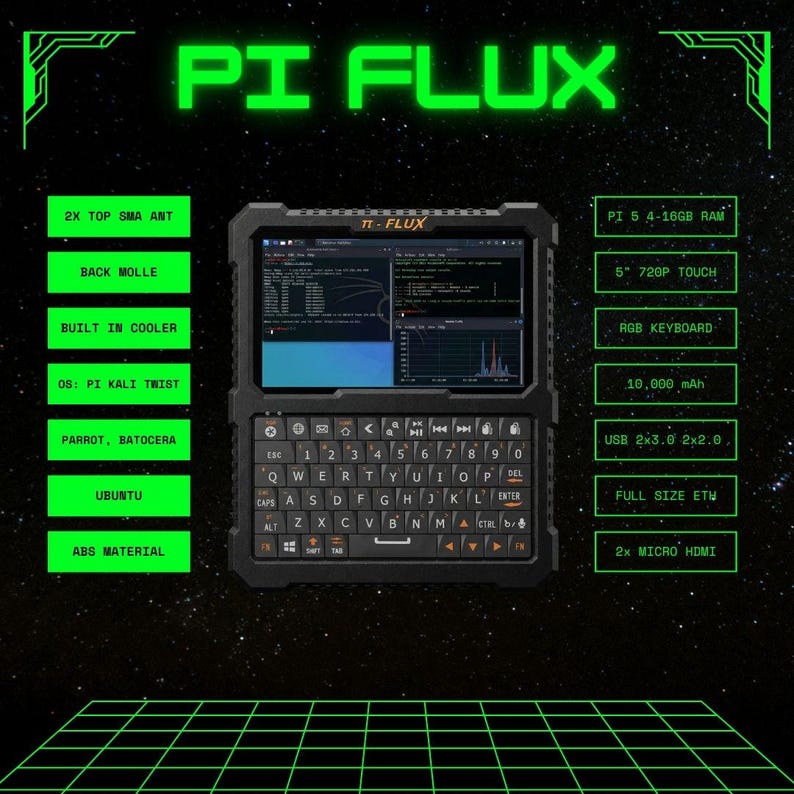
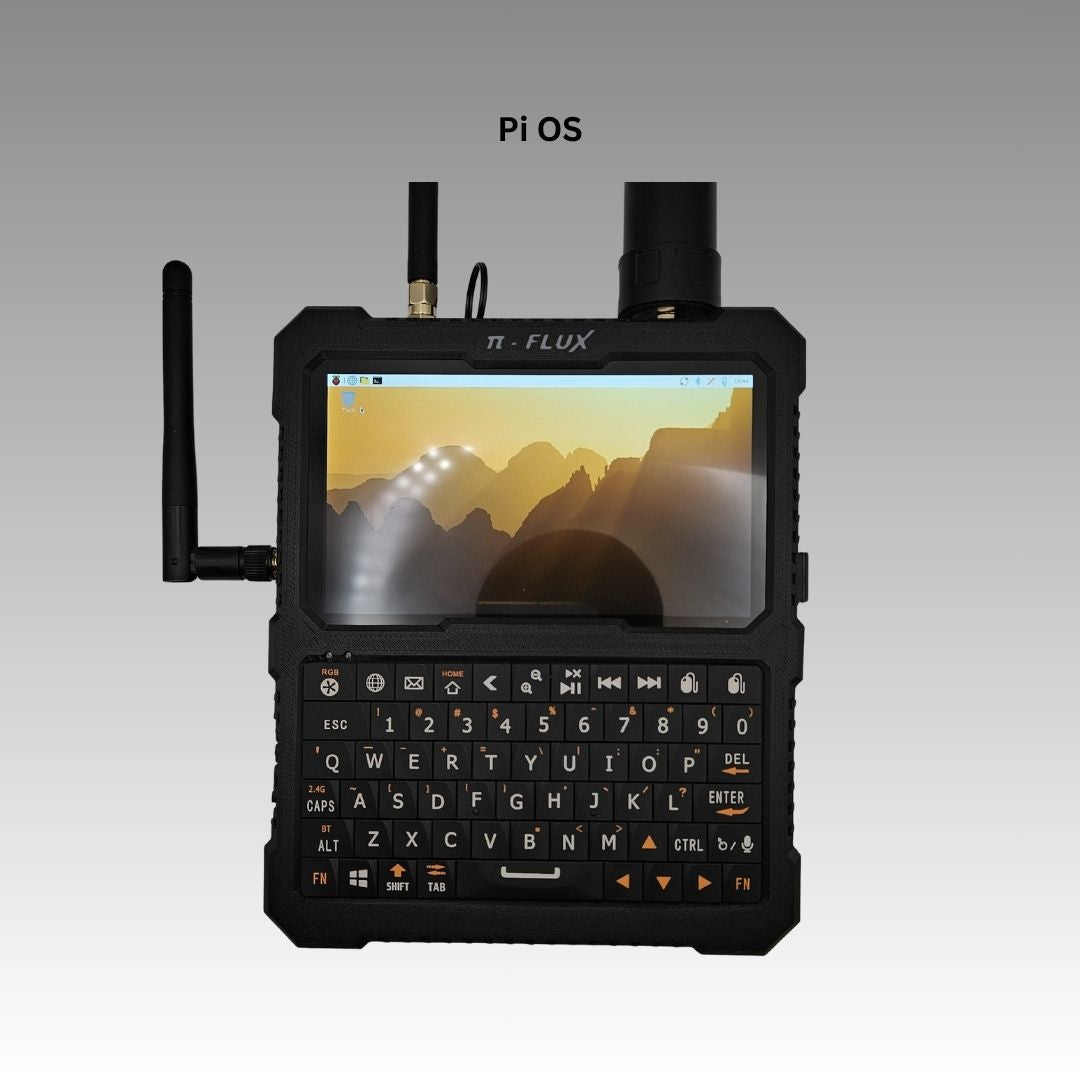
This is Volume 1 of an eight-volume reference for the PiFlux — a commercial Raspberry Pi 5 cyberdeck manufactured by Carbon Computers. The PiFlux is a portable all-in-one Linux field computer: a 5-inch 1920×720 HD touchscreen, a full RGB backlit keyboard with an integrated gyroscopic cursor, a 10,000 mAh internal battery, and a Raspberry Pi 5 compute board — all in a 574 g chassis that measures 6.5 × 5.5 × 1.3 inches. The device ships with Raspberry Pi OS by default and supports instant OS swap via microSD.
Within the Cyberdecks hub, the PiFlux series carries the platform-depth role for the Raspberry Pi 5. The sibling DFCD deep-dive shares the same Pi 5 compute board but does not duplicate the platform analysis; instead it cross-references this series for RAM tier selection, M.2 NVMe expansion, power and thermal engineering, OS configuration, and SDR. Readers who want the full Pi 5 story — independently of the DFCD chassis or any other sibling deck — begin here.
Table 1 — 1. About this Series
| Vol | Title | Scope |
|---|---|---|
| 1 | Overview & Platform Introduction (this) | What the PiFlux is, Carbon Computers, base specs, barebones vs. full kit, add-on catalog overview, series guide |
| 2 | Choosing the Pi 5 | 2/4/8/16 GB RAM tiers, PCIe and M.2 capability, what to buy for this workload |
| 3 | M.2 Storage | M.2 Mod / HAT+, NVMe selection, boot-from-NVMe, SD vs. NVMe |
| 4 | Power & Thermal with M.2 | Power budget, runtime impact, Active Cooling System, heat management |
| 5 | The Add-On Catalog | Every add-on detailed: what it is, what it does, when to choose it |
| 6 | Full Build with All Add-Ons | Step-by-step assembly of barebones + Pi 5 + all modules |
| 7 | OS Options & Multiboot | All supported OSes, multiboot strategies, boot-selection workflow |
| 8 | SDR Capabilities & vs. uConsole | Advanced Radio SDR, software stack, bands; comparison to the uConsole |
1.2 What the PiFlux Is
1.2.1 The hardware sentence
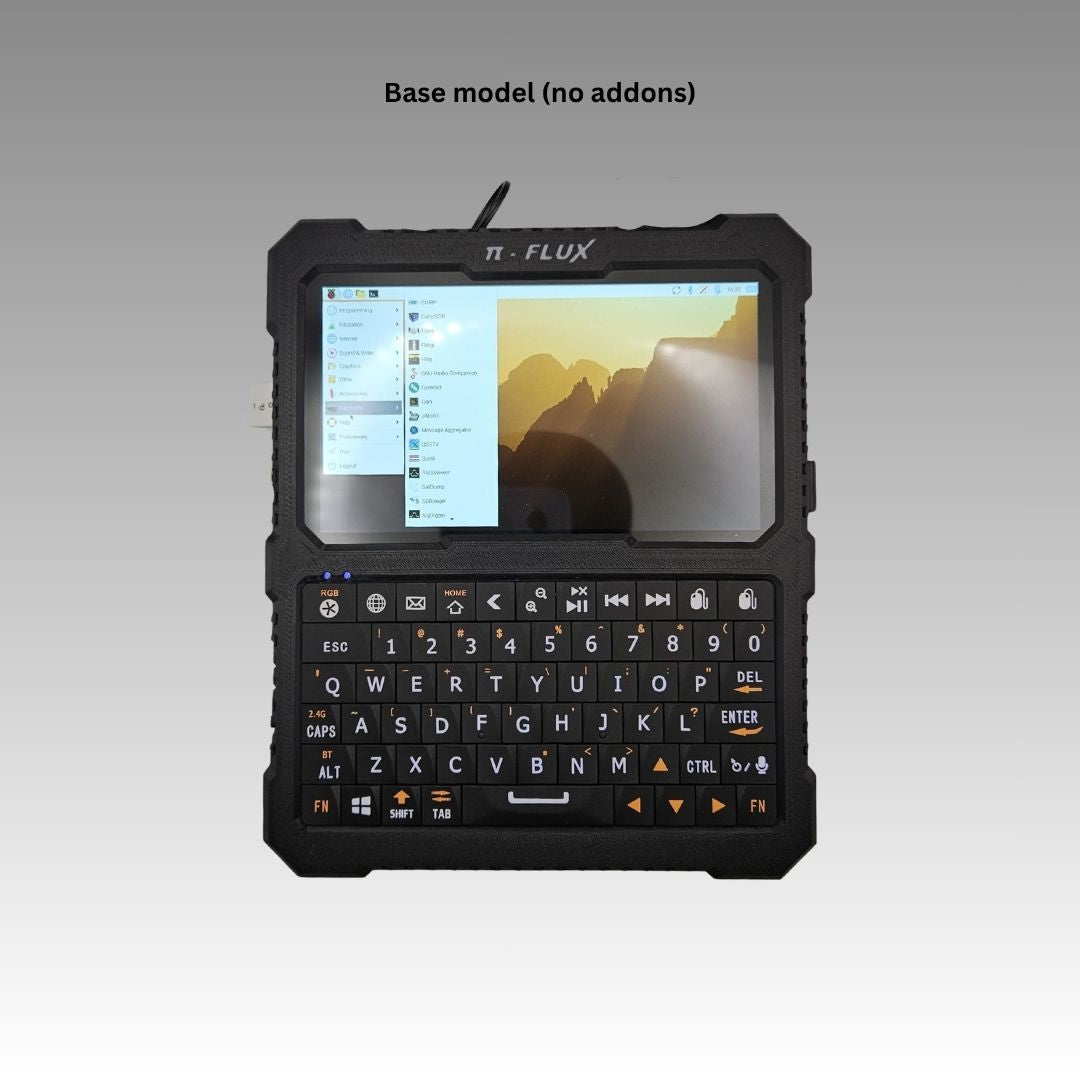
A 5-inch 1920×720 HD touchscreen. A full RGB backlit keyboard with an integrated gyroscopic cursor that eliminates the need for an external mouse. A Raspberry Pi 5 compute board — buyer’s choice of 2, 4, 8, or 16 GB LPDDR4X — in a chassis that weighs 574 g and measures 6.5 × 5.5 × 1.3 inches. A 10,000 mAh internal battery delivering three to five hours of runtime. Raspberry Pi OS on a microSD card by default, swappable in seconds for any of six supported distributions.
That is the PiFlux. Everything else in this series — the M.2 module, the radio add-ons, the active cooling system, the full-build assembly guide — is what the builder adds to that foundation.
1.2.2 Carbon Computers and the commercial cyberdeck
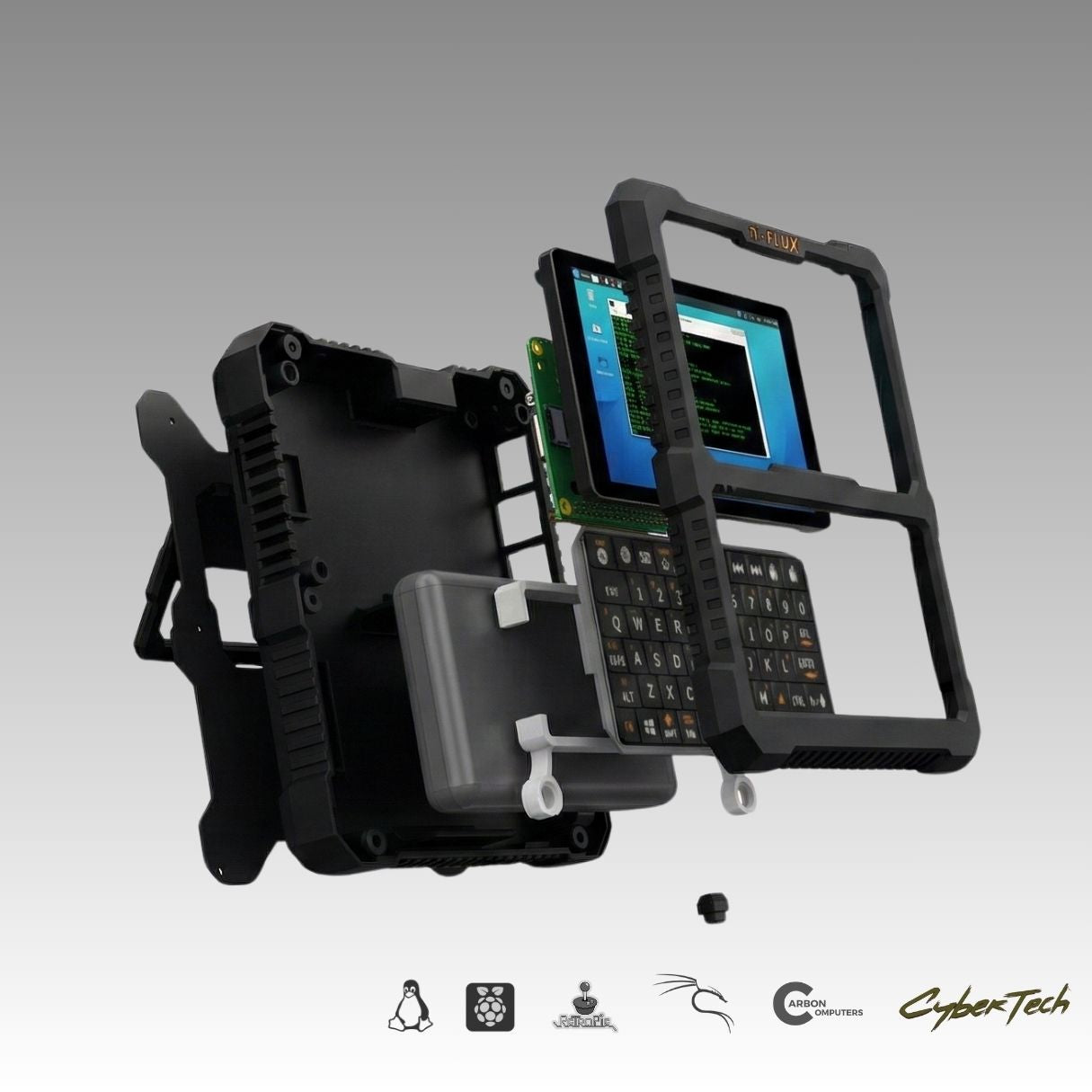
Carbon Computers positions the PiFlux as a ready-to-use Linux cyberdeck rather than a kit requiring significant assembly. Where the DFCD is an open-source 3D-printed design that the builder sources and assembles from scratch, the PiFlux is a turnkey product: the buyer receives a complete unit with chassis, display, keyboard, and battery integrated, a Pi 5 already installed (in the full configurations), and a working Raspberry Pi OS image on the bundled SD card.
The add-on modules are the exception: the M.2 Mod, radio boards, external WiFi adapter, and active cooling system are separate purchases that the owner installs. Volume 6 covers the full assembly procedure for a PiFlux with all add-ons installed.
The commercial model carries practical advantages. Quality control over the chassis fit and the display integration is handled by the manufacturer rather than by the builder. The keyboard and gyroscopic cursor are pre-calibrated. Carbon Computers provides a build video (https://youtu.be/YwcIiGrZ_AY) covering the add-on installation procedure. For a builder who wants a working Pi 5 cyberdeck without the chassis design and sourcing overhead, the PiFlux is a direct path.
1.2.3 Who this device is for
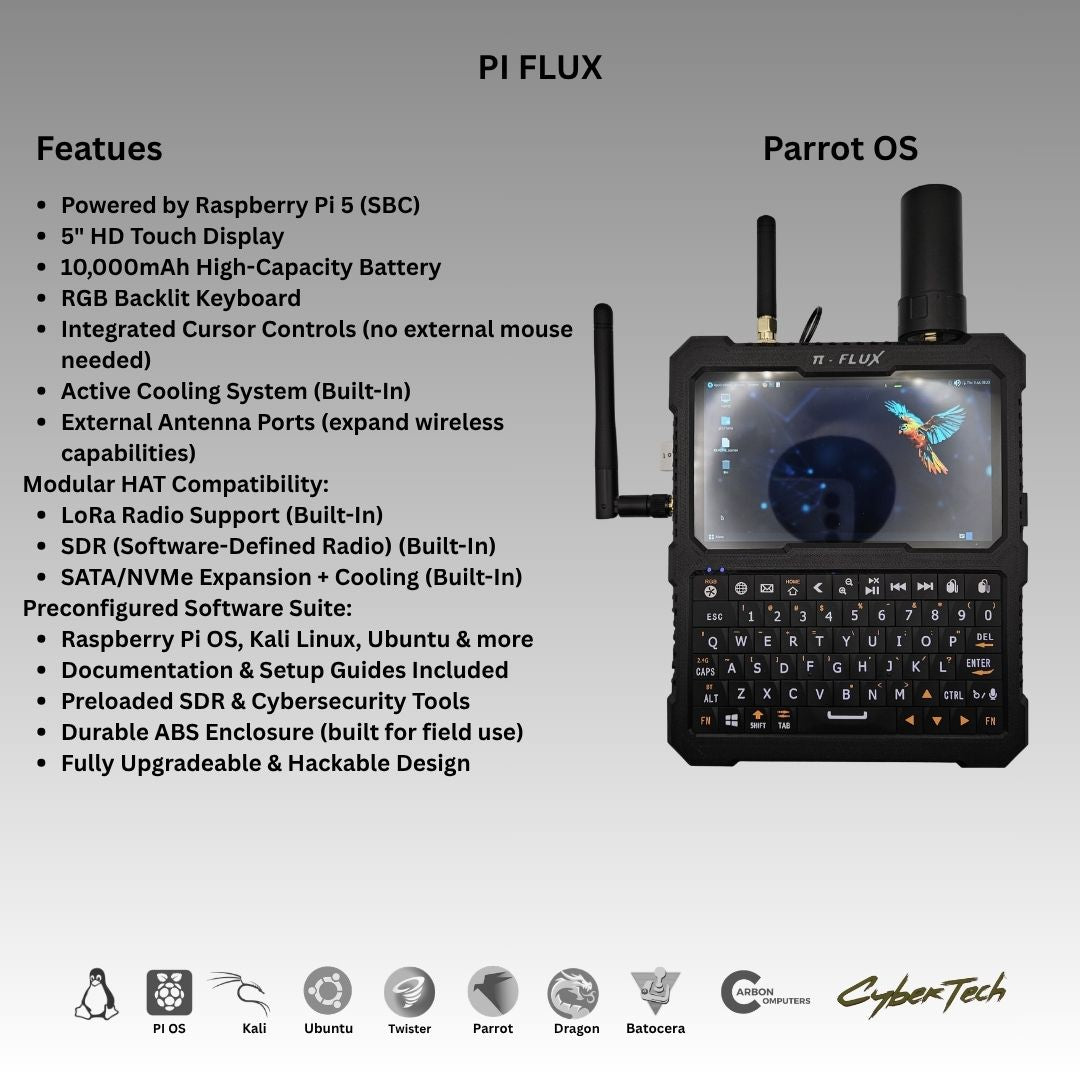
The PiFlux is calibrated for the field Linux user who wants a self-contained computer small enough to carry in a bag, durable enough for outdoor use, and capable enough to run a credible Linux desktop or terminal workflow without external peripherals. The gyroscopic cursor eliminates the mouse; the touchscreen handles pointer input for applications that benefit from it. The device is genuinely pocketable in a cargo pocket or jacket pocket at 574 g and sub-200 mm in its longest dimension.
The radio add-ons — GPS, LoRa, and external SDR via the Advanced Radio module — make the PiFlux a natural fit for the amateur radio operator who wants a portable digital-mode terminal, a GPS-aware LoRa node, or a field SDR receiver. Volume 8 addresses that use case in detail and compares the PiFlux’s SDR story to the Clockwork uConsole’s.
The 2 GB and 4 GB RAM configurations serve users running lightweight terminal workflows, scripts, and single applications. The 8 GB and 16 GB configurations are appropriate for concurrent applications, heavier desktop use, or any workload that keeps multiple services resident simultaneously — including SDR-adjacent processing pipelines. Volume 2 walks the selection decision.
The PiFlux is not a high-performance workstation substitute. The Raspberry Pi 5’s Cortex-A76 cores are capable, but the device is calibrated for the portable field task: investigation, monitoring, communication, and light data processing rather than sustained compiling, video transcoding, or large ML inference.
1.3 Barebones Kit vs. Complete Unit
Carbon Computers sells the PiFlux in two purchasing paths: a complete unit with the Pi 5 pre-installed, and a Barebones Kit that includes the chassis, display, keyboard, and battery with the Pi 5 sold separately.
The complete units ship at four RAM tiers — 2 GB ($449), 4 GB ($549), 8 GB ($649), and 16 GB ($849) — with bundled SD card storage (32 GB at the 2 GB and 4 GB tiers, 64 GB at the 8 GB tier, 128 GB at the 16 GB tier). The Barebones Kit is priced at $299 and is the appropriate purchase for the builder who already has a Pi 5 in hand, or who wants to source a specific Pi 5 SKU independently.
The Barebones Kit path adds one assembly step — seating the Pi 5 in the chassis and connecting it to the display and keyboard — but is otherwise identical to the complete unit at the hardware level. Volume 6 covers the full assembly procedure for both paths.
Table 2 — 3. Barebones Kit vs. Complete Unit
| Configuration | RAM | Bundled Storage | Price |
|---|---|---|---|
| Complete — 2 GB | 2 GB LPDDR4X | 32 GB SD | $449 |
| Complete — 4 GB | 4 GB LPDDR4X | 32 GB SD | $549 |
| Complete — 8 GB | 8 GB LPDDR4X | 64 GB SD | $649 |
| Complete — 16 GB | 16 GB LPDDR4X | 128 GB SD | $849 |
| Barebones Kit | — (Pi 5 sold separately) | — | $299 |
All prices above and in Section 5 are as listed on the Carbon Computers product page on 2026-06-27 and are subject to change — confirm current pricing before purchase.
1.4 Base Spec Summary
The following table covers the specification of every complete-unit PiFlux configuration. Add-on modules are listed separately in Section 5.
Table 3 — 4. Base Spec Summary
| Parameter | Value | Notes |
|---|---|---|
| Compute | Raspberry Pi 5 | 2 / 4 / 8 / 16 GB LPDDR4X configurations |
| Display | 5-inch HD touchscreen | 1920×720 resolution; touch-optimised for Linux |
| Keyboard | Full RGB backlit keyboard | Integrated gyroscopic cursor; no external mouse required |
| Battery | 10,000 mAh internal | ~3–5 h runtime under typical use |
| Dimensions | 6.5 × 5.5 × 1.3 in | |
| Weight | 574 g (1.2 lb) | |
| Default OS | Raspberry Pi OS | Installed on bundled microSD |
| Supported OSes | Pi OS, Ubuntu, Kali, Parrot Security, Twister OS, Batocera | Instant swap via microSD |
| Build video | https://youtu.be/YwcIiGrZ_AY | Add-on installation coverage |
| Product page | https://carboncomputers.us/products/pi-flux |
1.5 The Add-On Catalog
The PiFlux’s add-on ecosystem is what elevates the device from a bare Pi 5 box to a configurable field platform. Eight add-on offerings are available from Carbon Computers at the time of writing; Volume 5 covers each in full detail.
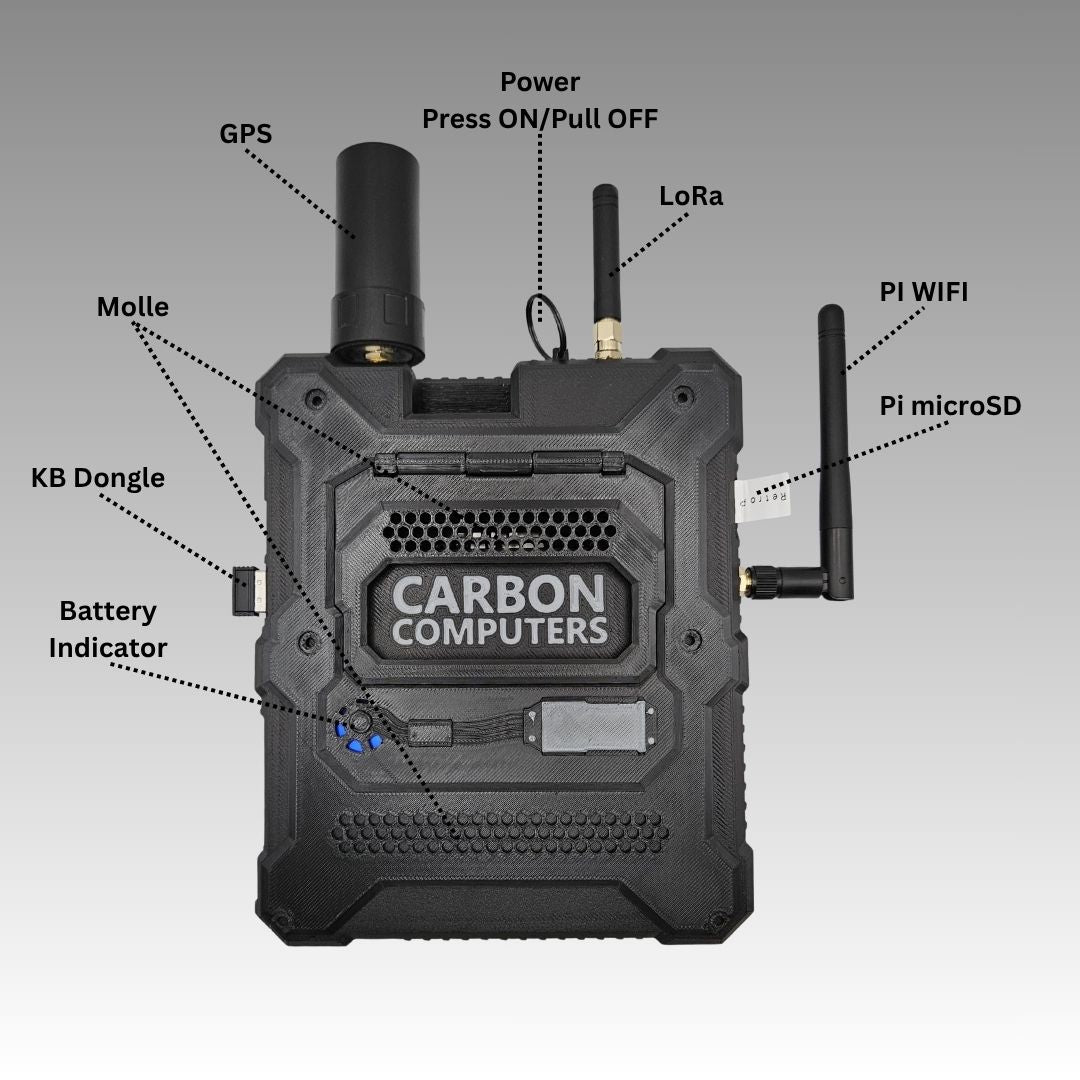
Base Radio ($49–$59) adds integrated GPS and LoRa to the chassis. GPS provides position awareness for field logging and geolocation-sensitive workflows; LoRa provides long-range, low-bandwidth packet radio capability for mesh networking and telemetry. This module does not include SDR.
Advanced Radio ($149) is the full radio module: GPS + LoRa plus external SDR support. The SDR capability is the meaningful upgrade over the Base Radio — it opens the device to wideband receive across the bands covered by the connected SDR front end. Volume 8 covers the SDR use case and compares it to the uConsole’s radio story.
M.2 Mod ($59) adds an M.2 NVMe storage slot to the chassis, exploiting the Raspberry Pi 5’s PCIe 2.0 lane exposed via the HAT+ connector. NVMe provides a step-change in sequential I/O and random-access performance compared to microSD. The M.2 form factors compatible with the PiFlux chassis are covered in Volume 3.
External WiFi Mod ($39) adds a second Wi-Fi interface via an external adapter. This is the appropriate choice for use cases that require simultaneous management-plane and monitor-mode operation, or that need the additional throughput or frequency band coverage of a dedicated external radio.
Active Cooling System ships standard on complete (“Plug & Play”) units and is not a separately-priced add-on; the Barebones Kit does not include it, and Carbon lists no aftermarket path to add one (see Vol 5). It is the thermal management solution for the Pi 5 under sustained load. The Pi 5’s onboard thermal controls will throttle the core frequency when junction temperature climbs; the Active Cooling System adds active airflow to extend the sustained performance envelope. Volume 4 covers the power budget and thermal analysis in detail.
SD Cards are available in 128 GB ($49) and 256 GB ($99) options for use as the primary OS media or as additional OS swap cards for multiboot configurations.
Barebones Kit ($299) is covered in Section 3 above.
3D-Printed Case ($49.99) is a replacement housing for builders who want to modify the chassis for a custom build — different module apertures, different finish, or a variant form factor. This is also the natural starting point for builders using the PiFlux platform as a basis for a derivative design.
Table 4 — 5. The Add-On Catalog
| Add-On | Contents | Price |
|---|---|---|
| Base Radio | GPS + LoRa | $49–$59 |
| Advanced Radio | GPS + LoRa + external SDR support | $149 |
| M.2 Mod | M.2 NVMe interface (PCIe via HAT+) | $59 |
| External WiFi Mod | External Wi-Fi adapter | $39 |
| Active Cooling System | Active thermal management | Included on complete units (not a standalone SKU) |
| SD Cards | 128 / 256 GB options | $49 / $99 |
| Barebones Kit | Chassis + display + keyboard + battery (Pi 5 not included) | $299 |
| 3D-Printed Case (DIY) | Replacement chassis housing | $49.99 |
1.6 Where Each Volume Goes Deeper
Volume 1 (this volume) establishes the context: what the PiFlux is, who it is for, how the barebones and complete-unit paths differ, and how to navigate the series. The remaining volumes each take one technical layer to real depth.
Volume 2 — Choosing the Pi 5 addresses the RAM tier decision. The 2 GB SKU is appropriate for single-application terminal workflows; the 4 GB tier handles light desktop use; the 8 GB tier provides comfortable headroom for concurrent desktop applications and SDR-adjacent processing; the 16 GB tier is warranted for workloads that keep large datasets in memory. The more important distinction for the PiFlux is the Pi 5’s PCIe 2.0 lane, exposed via the HAT+ connector: this is the interface that makes the M.2 Mod viable. Volume 2 explains what to buy and why.
Volume 3 — M.2 Storage covers the M.2 Mod in full. The Raspberry Pi 5 exposes PCIe 2.0 via the HAT+ connector; the M.2 Mod presents this as an M.2 Key M socket. This volume covers NVMe form factor compatibility (2230 and 2242 are the relevant options for the PiFlux chassis), NVMe endurance and performance selection for a Pi platform, and the procedure for configuring the Pi 5 to boot from NVMe rather than the SD card.
Volume 4 — Power & Thermal with M.2 addresses the power and heat implications of the full PiFlux configuration. Adding an NVMe drive to the Pi 5’s PCIe bus increases the system power draw; the 10,000 mAh internal battery’s runtime changes accordingly. The Pi 5 generates meaningful heat under sustained load — the Cortex-A76 cores at full frequency with an active NVMe can push junction temperatures toward the thermal throttle threshold. The Active Cooling System exists to address this. Volume 4 quantifies the power budget and the thermal margins.
Volume 5 — The Add-On Catalog covers every add-on in detail: what each module physically is, what it adds to the platform, the use cases it enables, and when each is the right choice. The Base Radio vs. Advanced Radio decision, the External WiFi Mod’s value for dual-radio workflows, and the Active Cooling System’s installation are all addressed here.
Volume 6 — Full Build with All Add-Ons is the assembly reference for the builder who wants to install every available module. Starting from the Barebones Kit, Volume 6 walks through seating the Pi 5, installing the M.2 Mod and NVMe, fitting the Base or Advanced Radio board, adding the External WiFi adapter, mounting the Active Cooling System, and routing all connections. Wiring, antenna mounting, fitment, and known assembly gotchas are covered in order.
Volume 7 — OS Options & Multiboot covers all six supported operating systems: what each is for, which use cases it serves on the PiFlux platform, and how to run more than one. The multiboot strategies range from simple SD card swapping (the PiFlux’s native quick-swap workflow) to PINN or BerryBoot on a single card, to splitting workloads across an SD card and an NVMe drive. Volume 7 gives the builder a decision framework and a tested boot-selection workflow.
Volume 8 — SDR Capabilities & vs. uConsole covers the Advanced Radio module’s SDR capability in depth: the SDR front end’s band coverage, the software stack (GQRX, SDR++, GNU Radio, Direwolf, and their dependencies on Pi OS ARM), antenna options for the PiFlux form factor, and representative field use cases. The volume closes with a head-to-head comparison between the PiFlux’s SDR story and the Clockwork uConsole’s radio and SDR ecosystem.
1.7 Sibling Cross-References: uConsole and DFCD
The PiFlux sits within a Cyberdecks hub that includes three sibling deep-dives. Understanding where the PiFlux fits relative to those devices is useful for readers choosing a platform.
Clockwork uConsole (../../Clockwork uConsole/) is a pocket-portable Linux deck built around the Clockwork Pi CM5 or A-06 compute module, with an integrated LoRa module, a 4G LTE module option, and an expansion port for external modules. The uConsole is smaller and more pocketable than the PiFlux; its screen and keyboard are correspondingly compact. The uConsole’s SDR story depends on the expansion port and external hardware; the PiFlux’s Advanced Radio module provides a more integrated path. Volume 8 compares the two directly on the SDR dimension.
DFCD (../../DFCD/) is an open-source 3D-printed cyberdeck designed for a specific use case: running FreeCAD in the workshop. It shares the Raspberry Pi 5 compute board with the PiFlux but differs in almost every other respect — it is builder-assembled from a publicly available STEP file set, it uses a 10.1-inch display on a sliding rail above a hidden TKL keyboard, and it runs from an NP-F battery via a step-down module. The DFCD deep-dive does not cover Pi 5 platform depth; it cross-references this series (PiFlux) for RAM selection, M.2, power, thermal, and OS material.
PicoCalc (../../Clockwork PicoCalc/) is a microcontroller-class device — it runs a real shell, qualifies as a cyberdeck under the hub’s classification rule, but is a different class of platform from the Pi 5 decks.
Table 5 — 7. Sibling Cross-References: uConsole and DFCD
| Device | Platform | Form factor | Screen | Distinctive use case |
|---|---|---|---|---|
| PiFlux | Raspberry Pi 5 | Compact clamshell, 574 g | 5 in, 1920×720 | Field Linux, radio, SDR |
| DFCD | Raspberry Pi 5 | Workshop deck, open design | 10.1 in, IPS touch | FreeCAD at the bench |
| uConsole | CM5 / A-06 | Pocket, clamshell | 5 in | Field Linux, RF, 4G LTE |
| PicoCalc | Microcontroller | Pocket, clamshell | Small | Terminal, learning |
1.8 Resources
Table 6 — 8. Resources
| Resource | URL |
|---|---|
| PiFlux product page (Carbon Computers) | https://carboncomputers.us/products/pi-flux |
| Build video | https://youtu.be/YwcIiGrZ_AY |
| Raspberry Pi 5 product page | https://www.raspberrypi.com/products/raspberry-pi-5/ |
| Raspberry Pi OS | https://www.raspberrypi.com/software/ |
| Kali Linux ARM | https://www.kali.org/get-kali/#kali-arm |
| Parrot Security OS | https://www.parrotsec.org/download/ |
| Ubuntu for Raspberry Pi | https://ubuntu.com/raspberry-pi |
| Batocera | https://batocera.org/ |
| Twister OS | https://twisteros.com/ |
| DFCD deep-dive (workshop Pi 5 deck) | ../../DFCD/ |
| uConsole deep-dive (pocket deck, SDR) | ../../Clockwork uConsole/ |
Comments (0)