DFCD · Volume 7
Living With It & Roadmap
Field-use notes, WIP modules, custom trackball electronics, and the upgrade path
7.1 Field-Use Notes
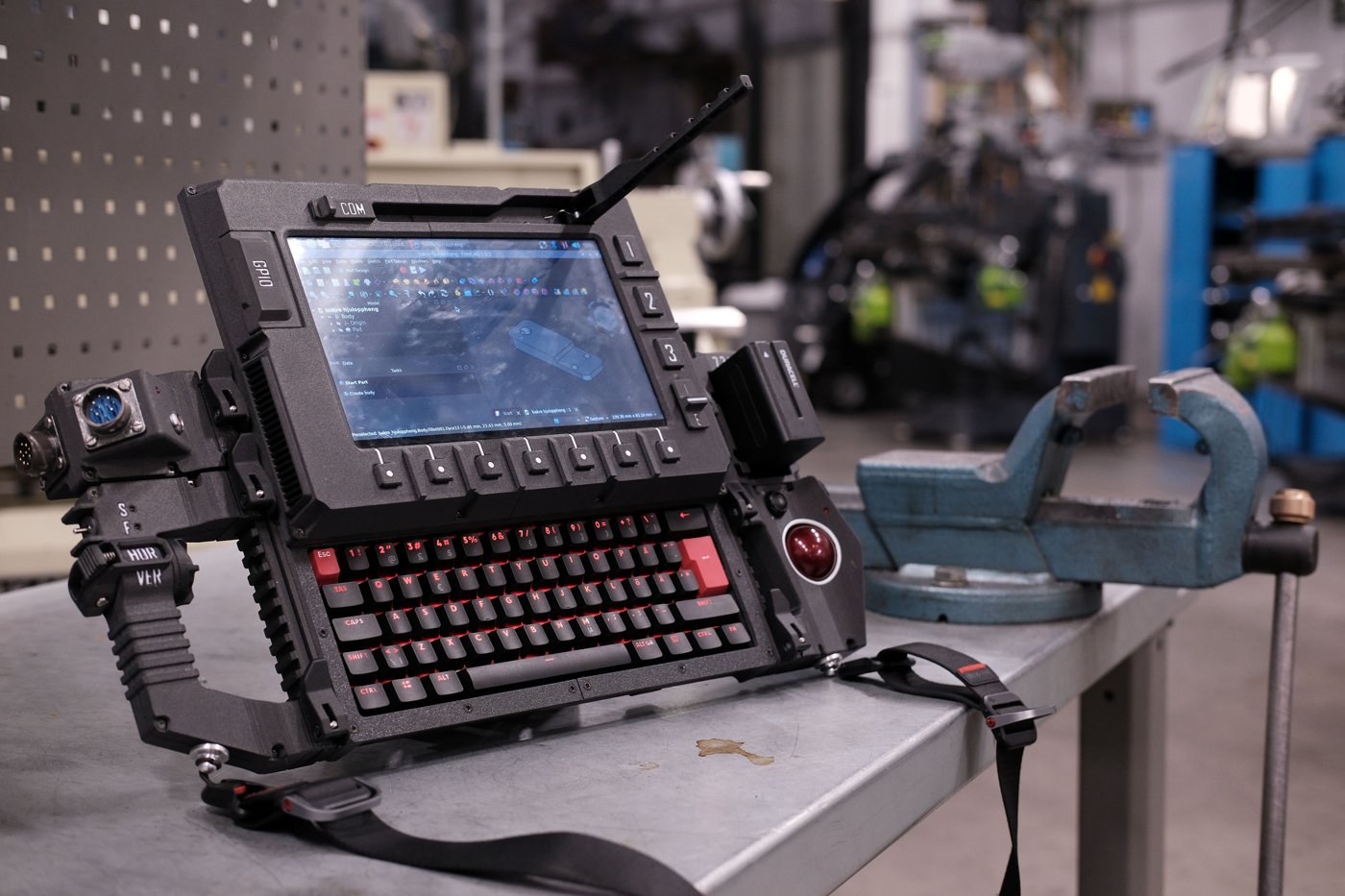
This volume’s status note applies here more than anywhere else in the series: as recorded in Volume 1, the DFCD’s hardware has not yet been acquired for this deep dive, so what follows is not a bench log. It is the upstream project’s own account of daily use, read closely, plus engineering conclusions that follow directly from the confirmed design (Volumes 2–4) — with the gap between the two marked honestly.
The anchor fact is the upstream repository’s current-status note, retrieved directly from the project README: “Screen is working, keyboard types, trackball rolls.” That plain sentence is the only first-person field report the upstream project has published, and it means exactly what it says — the three primary subsystems are confirmed functional in ordinary use, without elaboration on feel, longevity, or edge cases.
Building outward from that anchor: the sliding screen travels on a printed rail (Volume 3, §2.2) with a drag-chain (Volume 3, §3) carrying the display ribbon and any USB/GPIO wiring across the joint. Smooth travel and reliable retention when open depend on rail tolerance and any lubrication applied during assembly (Volume 4, §2.1) — a print-and-fit detail with no published field data, since the design is still within its first year on GitHub. Whether the drag-chain holds up over thousands of open/close cycles is an open question the project hasn’t been in service long enough to answer publicly.
The keyboard is the NOS C-450 Mini Pro on Outemu Red linear switches (Volume 2, §3.1) — smooth, non-tactile, undemanding of finger precision, a reasonable fit for shop use where hands aren’t always clean or dry. Whether it holds up well with work gloves is undocumented, and this volume won’t invent an opinion on it. What is a real advantage regardless: the closed screen doubles as a dust cover — protection an exposed keyboard lacks in a shop with metal chips, sanding dust, or coolant mist.
The trackball’s ergonomics for FreeCAD viewport navigation — orbit, pan, and zoom feel relative to a mouse — are shaped by the harvested Logitech Marble electronics (Volume 2, §4.1; Volume 4, §3) and the navigation-mode tuning covered in Volume 6. A trackball’s fixed base tends to suit orbit and fine positioning well and large pan sweeps less well — a general property of trackball input in 3D CAD viewports, not a DFCD-specific finding, and one the “trackball rolls” status note doesn’t elaborate on further.
NP-F battery management in practice follows from the pack’s spec (Volume 2, §5.1; Volume 5): 10,050 mAh at 7.2 V (72.4 Wh), with built-in USB-C charging that removes the NP-F ecosystem’s usual charger-cradle step. Whether the Joy-IT PiEnergy Mini supports true pass-through (charge and discharge simultaneously), or requires a swap or shutdown to recharge, is undocumented and flagged rather than assumed — Volume 5 works through realistic session lengths against the 72.4 Wh budget.
Shoulder-strap carry (Volume 2 hardware list; Volume 4, §7) is a structural feature with defined mounting points, the right call for a device meant to move between a CNC and an assembly table mid-session rather than sit fixed to one bench. Comfort over a full shift depends on strap hardware Volume 4 leaves as [VERIFY against the assembled unit or build video].
Ambient lighting versus display legibility is similarly constrained: the panel’s exact brightness rating wasn’t retrievable from its listing (Volume 2, §2.1), so legibility in bright shop lighting is [VERIFY against the panel datasheet or in-person testing]. IPS panels in this product class typically run in the few-hundred-nit range — adequate indoors, not in direct sun — category-typical, not a confirmed spec.
7.2 Current WIP Items
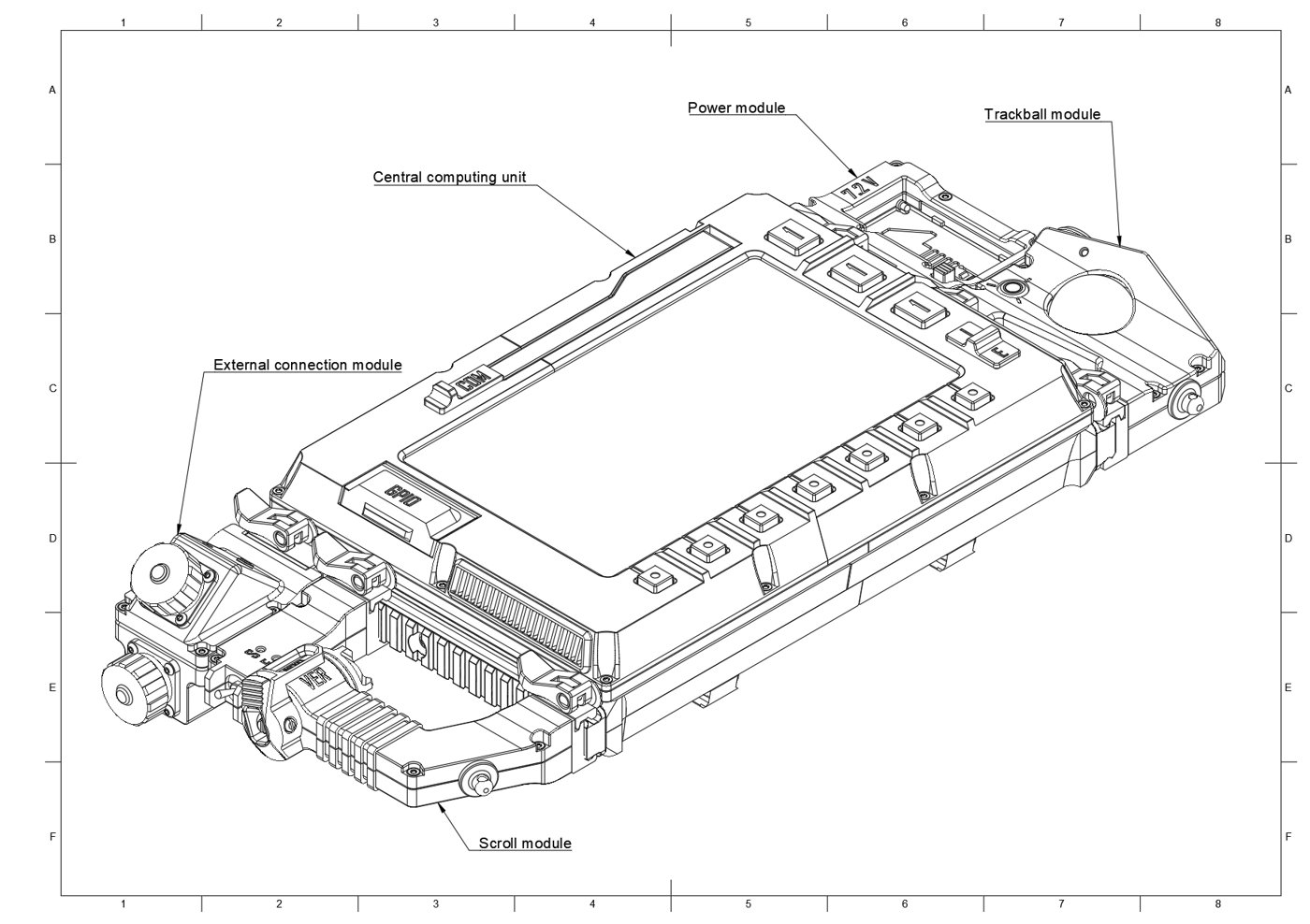
The upstream project is unusually direct about its own incompleteness, and this volume treats that directness as a feature rather than something to smooth over. The repository’s current-status note, confirmed by direct retrieval for this volume, reads: the screen, keyboard, and trackball are functional; the scrolling handle and left-side connection module are not yet wired; and the trackball’s electronics — presently the harvested Logitech Marble hardware — are a named future-replacement target. This section is scoped to what that status note and the project’s own issue tracker actually say, with no invented specifics for parts that remain unbuilt.
7.2.1 Left Connection Module
The left connection module’s role, described consistently across the project overview and Volume 1 (§3.1), is to provide external device ports — an accessible left-side connector position extending the rear USB power/signal rail system (Volume 2, §6; Volume 4, §5) so a builder can plug in an external device without reaching behind the chassis. The module’s printed shell and mounting geometry are part of the published chassis files (Volume 3, §4.2); the module-specific wiring is what remains outstanding.
No documentation retrieved for this volume assigns a specific connector or pinout to this module ahead of the others in the BOM — the 0B/2B self-locking connectors and Y2M 8-pin connectors (Volume 2, §6) are candidate parts for exactly this kind of module-to-rail joint, but which (if any) is earmarked for the left module’s ports is [VERIFY against the upstream wiki’s build guide, currently unreachable, or the build video]. This volume states the module’s purpose with confidence and its electrical interface as an open question, consistent with the upstream project’s own framing.
7.2.2 Scrolling Handle
The scrolling handle is the DFCD’s second unwired module, and the upstream issue history gives it more texture than the bare status note alone. In the module breakdown (Volume 1, Figure 1.3), this same component appears to be what the CAD files and issue tracker call the “scroll module” — the naming is informal and inconsistent, but the function described (an ergonomic grip for vertical/horizontal viewport panning, distinct from the trackball’s orbit/pan/zoom role) and its position in the module list line up closely enough that this volume treats them as the same part.
The maintainer’s own design note for this module — filed as an issue and closed in early March 2026 — describes the intended approach directly: a rotary encoder providing the scroll motion, paired with a toggle switch to alternate between horizontal and vertical scroll modes. That maps cleanly onto BOM items already confirmed in Volume 2: the rotary encoder with click (§7.1) and the toggle switches (§7.4) are exactly the parts such a design would need, though the upstream list doesn’t explicitly assign either part to this module over another use.
That the design-approach issue is closed does not mean the module is wired — the current README status note, retrieved fresh for this volume, still lists the scrolling handle as incomplete, and a separate, still-open issue describes the outstanding physical work: routing wiring from the screen module’s GPIO pins through the drag-chain (Volume 3, §3; Volume 4, §8) down to the fixed chassis. Read together, the honest picture is that the control scheme was settled months ago; what remains is threading that wiring through the same moving joint the display cable already crosses — a mechanically fiddly step, not an unsolved design problem.
7.2.3 Custom Trackball Electronics
The most clearly scoped future project in the upstream build is replacing the harvested Logitech Marble electronics with purpose-built trackball PCB hardware. This is stated plainly in the project’s own materials: the trackball currently works on salvaged Marble internals, and the maintainer’s stated intent is custom electronics that remove the dependency on sourcing a discontinued donor device — explicitly framed as making the build more accessible, since a working secondhand Marble will only get scarcer as more builds consume the remaining supply (a scarcity risk Volume 2, §9 also flags).
Beyond that stated intent, no schematic, sensor part number, PCB form factor, or timeline has been published, and this volume will not invent one. What can be said honestly is the shape of the improvement: a housing built to the DFCD’s own module dimensions rather than adapted to a donor shell, no dependency on a scarce secondhand product, and — depending on the unspecified sensor — potentially a different ball size or surface than the Marble ships with. Builders who want a working trackball today should plan on the Marble harvest (Volume 2, §4.1; Volume 4, §3.1); the custom-PCB path remains a roadmap item, not an alternative currently available to build against.
7.3 Living With the Slider Mechanism
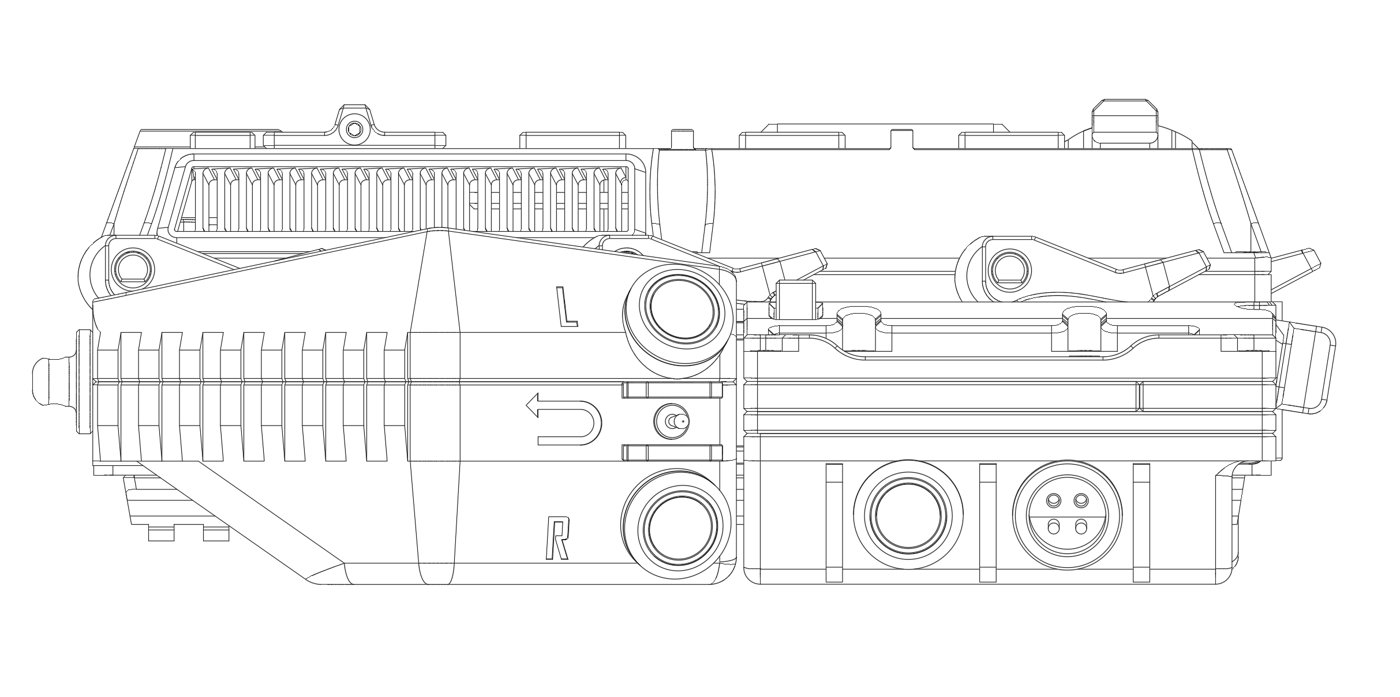
The sliding screen over the hidden keyboard is the DFCD’s single most distinctive mechanical feature, and also the one with the most exposure to long-term wear: a rail engaged thousands of times over a device’s life, and a drag-chain flexing on every cycle to carry the display ribbon (and any touch/GPIO wiring, once the WIP modules are wired) across the joint.
The honest starting point is that the upstream project hasn’t been public long enough to generate a multi-year durability record — its growth (593 stars/59 forks when Volume 1 was written, to 601 stars, 59 forks, and 45 watchers confirmed for this volume) reflects an actively growing but still young community, not one that has put finished units through years of shop service and reported back. Rail wear, drag-chain flex-cycle life, and any lubrication schedule are therefore engineering expectations drawn from the printed-rail design (Volume 3, §2.2; Volume 4, §2.1), not field-tested figures — a distinction this volume marks rather than presenting inference as data.
What can be said with more confidence is the daily-use discipline the design imposes, since it follows from geometry rather than unreported experience: a device whose keyboard is only exposed when deliberately slid open has different handling habits than one with a permanently exposed keyboard. For a shop tool that may sit closed between fabrication sessions, that closed-by-default state passively protects against dust, metal shavings, and coolant exposure a keyboard left out for months would otherwise accumulate. It also makes opening the DFCD a small, deliberate action rather than an instant one — a minor friction point relative to a laptop’s hinge, but arguably the right tradeoff for a device that spends more time closed and waiting than open and in use.
Maintenance-wise, the printed rail’s tolerance is set at the fit-and-finish stage (Volume 3, §6.2), and any slide-smoothness degradation over time would most plausibly show up as accumulated print dust or grit in the rail channel rather than wear of the printed material itself — a periodic wipe-down is a reasonable precaution, though the upstream project publishes no maintenance schedule and this volume does not invent one.
7.4 Upgrade Path
7.4.1 Compute Board
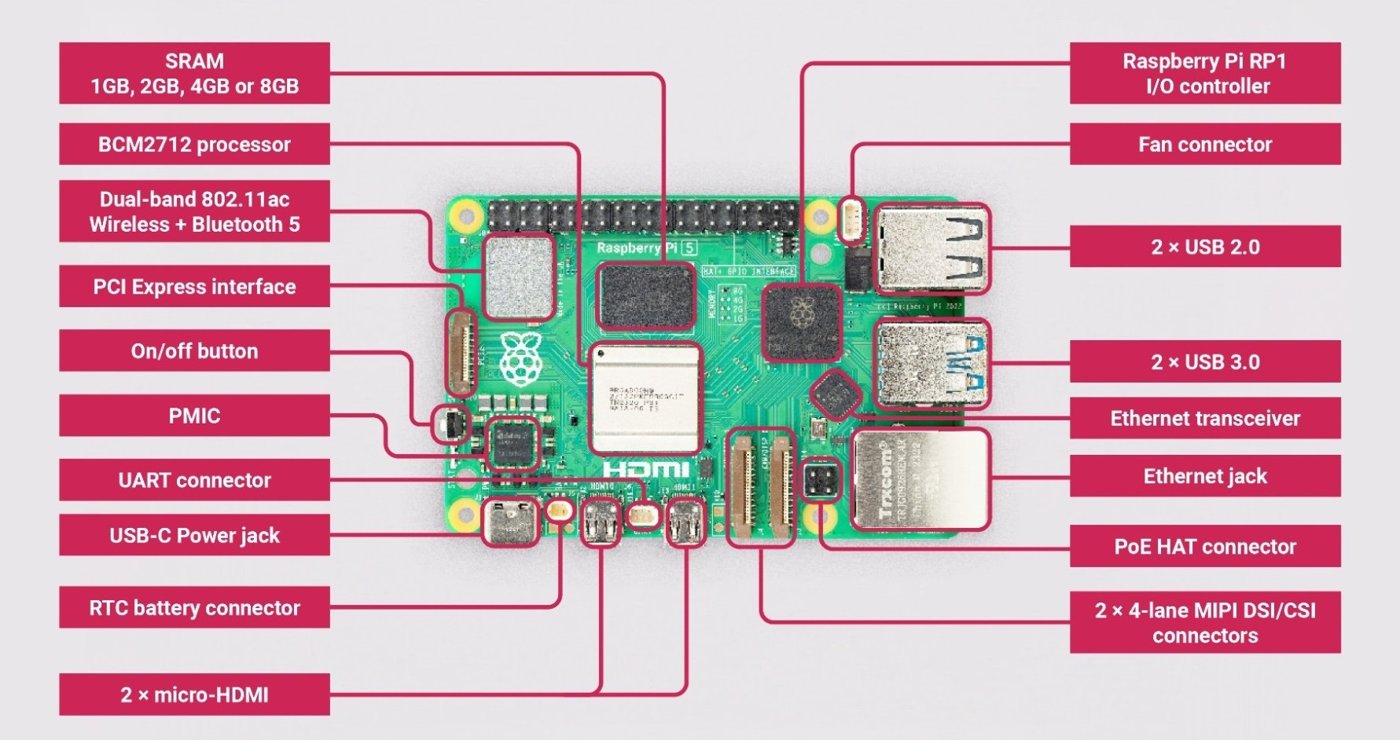
The DFCD’s compute board is the Raspberry Pi 5 (8 GB), and the chassis’s central module is built around that board’s physical footprint, the Joy-IT cooler’s clearance requirements (Volume 2, §1.2), and its power draw characteristics (Volume 2, §1.1; Volume 5). A future builder upgrading to a later Pi generation or Compute Module revision would need to verify both dimensional fit and the step-down module’s output against the new board’s power requirements before assuming a drop-in swap — this volume does not speculate about unreleased Raspberry Pi hardware.
Community interest in a more substantial compute-platform swap already exists in the issue tracker, worth reporting honestly as proposed rather than built: one open issue proposes replacing the Pi with a Framework laptop mainboard for more processing headroom given rising Pi prices; another proposes an x86 Steam Deck motherboard (quad-core/eight-thread, 16 GB RAM, dedicated graphics) for Windows compatibility and hardware-accelerated CAD, with its author offering their own IT-engineering and micro-soldering background toward the work. Neither issue has a maintainer response, an associated pull request, or a documented build as of this writing, and both authors acknowledge open questions — chassis-modification scope for the Framework idea, battery-life uncertainty for the Steam Deck idea. These are real signals of where builder interest is heading, not confirmed roadmap items, and this volume reports them at exactly that level of confidence.
7.4.2 Display
Upgrading to a larger or higher-resolution display would require chassis redesign for the sliding rail and panel mount (Volume 3, §2.2), but the video path — micro HDMI, per the ribbon assembly in Volume 2, §2.2 — would remain compatible with the Pi 5 and its successors regardless of panel choice. The touch interface would need re-evaluation for whatever panel replaces the current unit, since Volume 2 (§2.1) could not confirm the touch-controller behavior of the current panel from its listing.
Notably, the BOM itself already carries an open ambiguity here rather than a clean single spec: a builder flagged in the issue tracker that the linked AliExpress display listing references two physically different screen options — a 1024×600 panel at roughly 236 × 146 mm, and a 1280×800 panel at roughly 239 × 157 mm — with no resolution from the maintainer as of this writing on which is correct. That is a genuinely open documentation gap, not a hypothetical upgrade path, and a builder sourcing the display today should confirm the physical panel size against the chassis rail dimensions (Volume 3) before ordering, not assume either figure from Volume 2’s category-typical estimate.
7.4.3 Power System
The NP-F format offers a natural upgrade path in principle: a higher-capacity pack in the same F970 shell would extend runtime with no other change, provided it fits the battery-bay dimensions (Volume 4, §4.1) and its input voltage matches what the step-down module expects. Third-party NP-F970-shell packs are sold across a range of capacities above the reference build’s 10,050 mAh, though the specific higher-capacity options and their availability are [VERIFY against current battery-vendor listings at build time].
The more interesting upgrade signal comes directly from the issue tracker: an open issue reports that the current step-down module was sized for a Raspberry Pi 4 and lacks capacity for additional USB devices a builder might add, requesting a replacement delivering 5 A at 5.1 V — matching the Pi 5’s own full-performance PD target (Volume 2, §1.1). That issue has no maintainer response or proposed part as of this writing, but it directly confirms the Joy-IT PiEnergy Mini’s 3 A ceiling (Volume 2, §5.2) is a recognized constraint inside the project, not only an outside observation. A builder wiring the left connection module or other USB expansion should treat Volume 5’s power budget as the binding constraint until that buck-converter question is resolved upstream.
7.5 Community Modifications
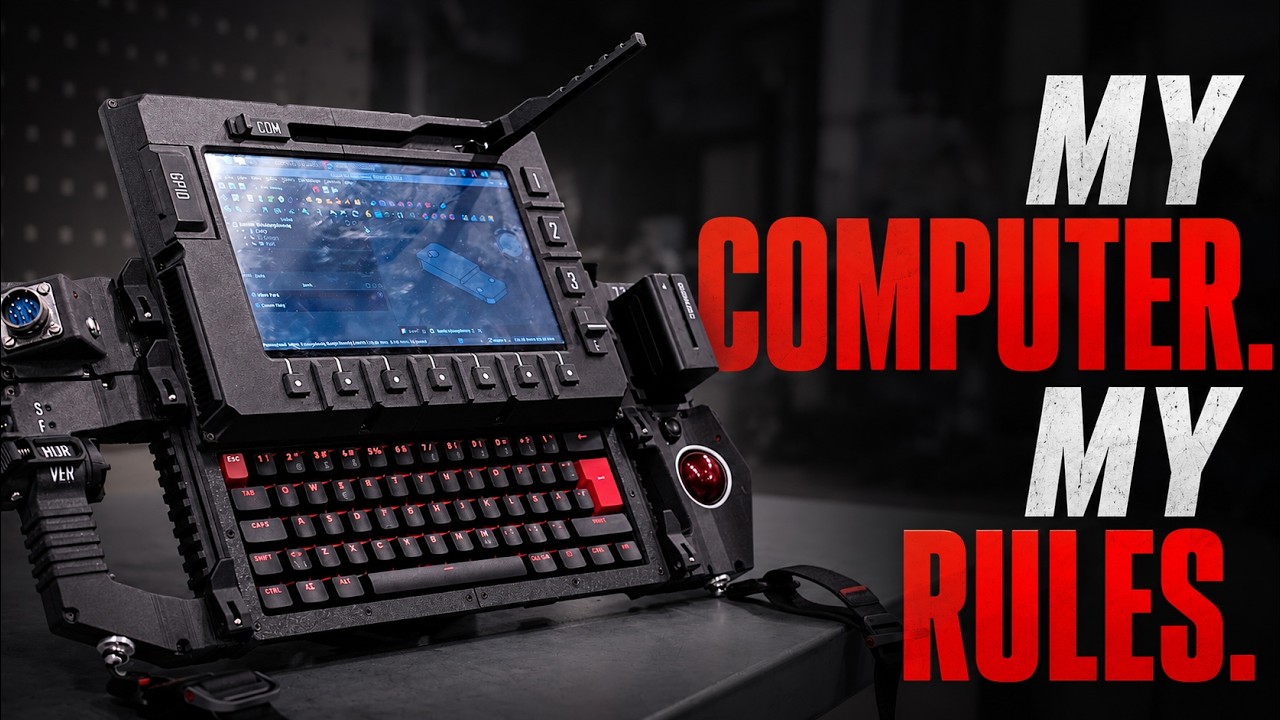
The upstream DFCD design explicitly invites modification rather than merely tolerating it. The maintainer’s own framing, confirmed from the project README, states it directly: the design can be built as-is, or a builder can change the modules, redesign the rails, replace the electronics, or use only parts of the system in an unrelated project — with an open invitation to share custom modules or complete alternate builds back to the community. That stance, combined with the fully open STEP and mesh files (Volume 3, §1), is what makes the DFCD a platform in the sense Volume 1 uses the word, rather than a single fixed product.
The numbers back this up: 593 stars and 59 forks when Volume 1 was authored, grown to 601 stars, 59 forks, and 45 watchers as confirmed directly from the repository for this volume — modest but real growth for a project still within its first year of public life. Fork count alone doesn’t say what any individual fork changed, and this volume will not invent specifics for forks it hasn’t inspected; what it can report honestly is the shape of the modification interest visible in the issue tracker, a rough preview of where forks are likely headed even where a finished fork isn’t yet documented:
- Alternate compute platforms — the Framework-mainboard and Steam Deck-x86 proposals discussed in §4.1, both filed as ideas rather than completed swaps
- A wireless mesh-networking module — an open, “help wanted”-labeled issue proposing a small USB Meshtastic module mounted in the chassis, a plausible fit given the rear USB rail system already exists for this kind of add-on
- A custom PCB for the sliding screen’s currently non-functional buttons, proposed to expose them as configurable Linux hotkeys — a distinct idea from the custom trackball PCB (§2.3), not to be conflated with it
- Display substitution, an area where the BOM’s own two-SKU ambiguity (§4.2) already means different builders may run physically different panels without anyone having “forked” anything
None of these has a documented maintainer response, merge, or completed build as of this writing, so this volume reports them as exactly what they are: real, specific evidence of community energy directed at the platform, filed in the open, but not yet realized designs. For builders without 3D-printing access, the PCBWay manufacturing path (Volume 1; Volume 3, §7) lowers the barrier to acting on ideas like these, since a STEP-file modification doesn’t require owning a printer to test.
7.6 What the Author Would Do Differently
The upstream project does not publish a formal retrospective or a “what I’d change” write-up, and this volume will not manufacture one on the maintainer’s behalf. What exists instead, scattered through the issue tracker, are two signals that read as the closest available proxy for design regrets a future revision would likely address.
The first is the buck-converter sizing question from §4.3: an open issue notes plainly that the step-down module was originally selected for a Raspberry Pi 4’s power envelope and comes up short once a Pi 5 and additional USB devices are considered. That isn’t framed as an explicit “I would choose differently next time,” but a component the project’s own contributors are actively trying to replace is a reasonable stand-in for one.
The second is the display BOM ambiguity from §4.2 — two physically different panel options behind the same linked listing, with no documentation resolving which the reference build actually uses. A next revision naming a single confirmed SKU, rather than leaving builders to find the discrepancy themselves, would be a small but concrete fix consistent with the project’s own acknowledgment (Volume 1, §3.2) that “some parts may not yet have complete documentation.”
Beyond those two sourced data points, this volume declines to speculate further about regrets the upstream project hasn’t stated. What is worth saying plainly, in closing this series: the DFCD is a genuinely open, actively evolving platform rather than a finished product, and a builder starting today should treat Volume 2’s bill of materials, Volume 3’s chassis files, and this volume’s roadmap notes as a snapshot of a moving target — checking the repository’s current issues and status note before ordering is the natural way to build something this openly under construction.
Comments (0)