DFCD · Volume 1
Overview & Design Philosophy
What the DFCD is, the FreeCAD-in-the-workshop use case, the modular-core design, and a guide to this series
1.1 About this Series
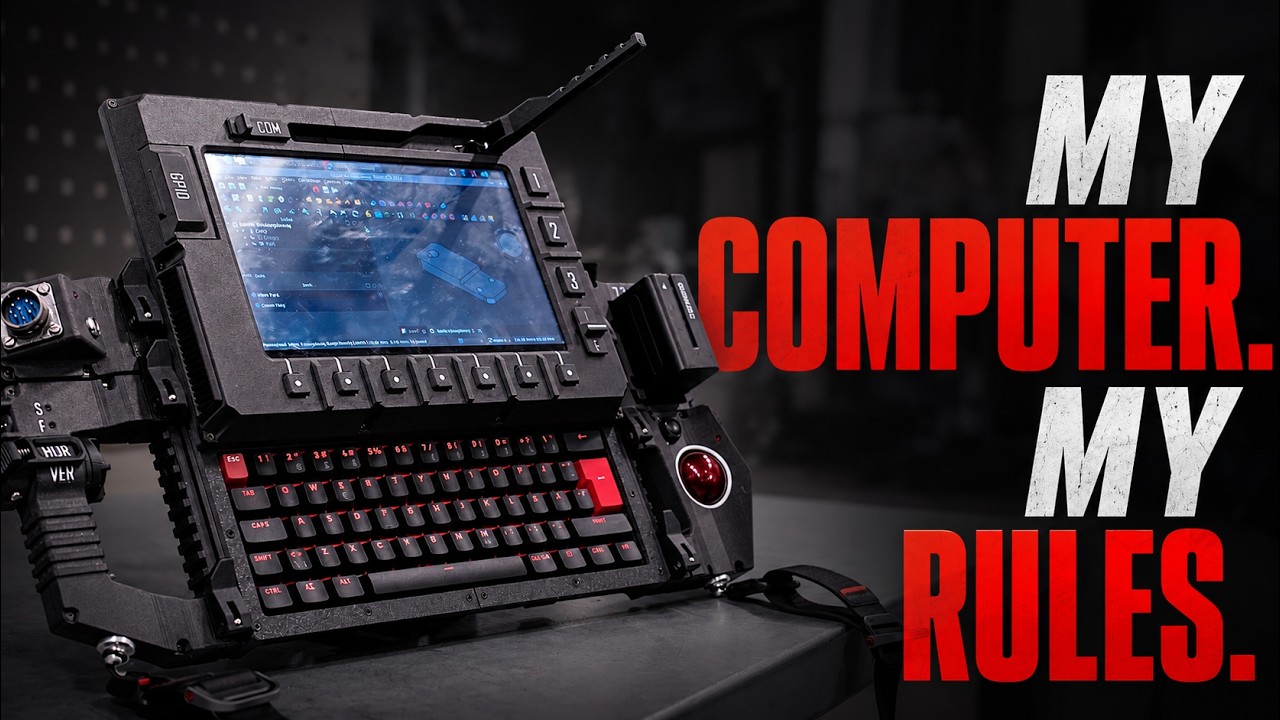
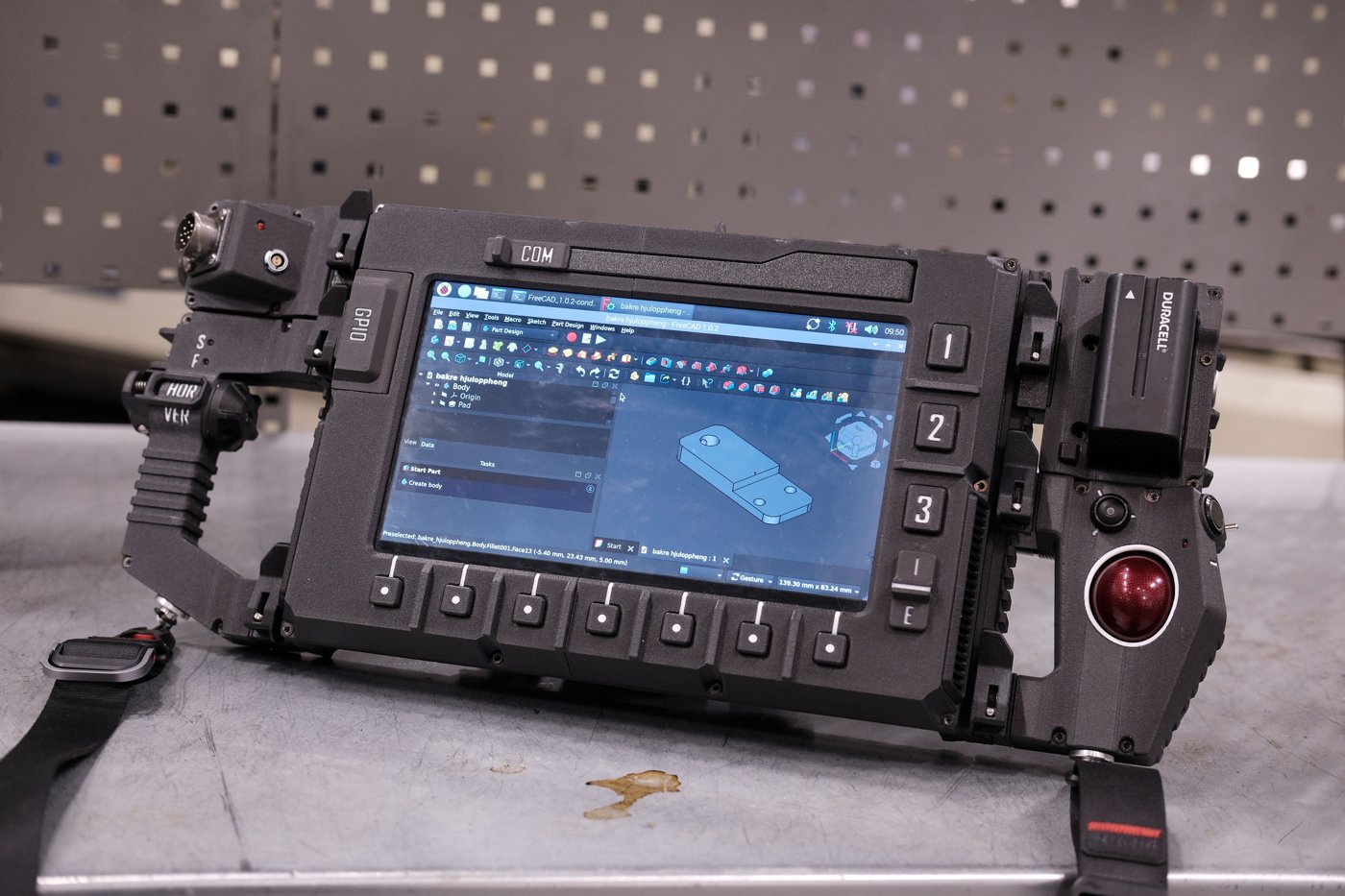
This is Volume 1 of a seven-volume reference for the DFCD (DesignatedFreeCadDevice) — a modular, 3D-printed cyberdeck designed to sit on the workbench and run FreeCAD in the field. The DFCD pairs a 10.1-inch IPS touch display on a sliding rail above a hidden compact mechanical keyboard (the NOS C-450 Mini Pro — a 60%-class, 62-key board the upstream hardware list labels “NOS 450 TKL”), a trackball input module on the right side, and a Raspberry Pi 5 (8 GB) compute board — all in a 3D-printed chassis built around the NP-F battery form factor and a rear USB power/signal rail system.
The device was designed by the ArcticEnrichmentCenter and all structural files — STEP models, mesh files, drag-chain parts, and a hardware list — are published openly for modification and reuse. The build attracted 593 stars and 59 forks by mid-2026, with active encouragement from the original author for community variants.
The series follows the same engineer-grade format as the sibling uConsole and PicoCalc references: each volume covers one functional layer at real depth — bill of materials with sourcing notes, 3D-print settings, assembly sequence, power system engineering, OS configuration. Volumes 2 through 7 are structured stubs ready for authoring; this volume is complete.
Table 1 — 1. About this Series
| Vol | Title | Scope |
|---|---|---|
| 1 | Overview & Design Philosophy (this) | What the DFCD is, the design philosophy, spec summary, series guide |
| 2 | Bill of Materials & Sourcing | Pi 5, NP-F battery, screen, keyboard, trackball, connectors, sourcing notes |
| 3 | Printing the Chassis | STEP/mesh inventory, print settings, orientation, material, post-processing |
| 4 | Assembly & Wiring | Slider mechanism, trackball module, power path, USB rails, shoulder mounts, drag-chain |
| 5 | Power System | NP-F battery, step-down conversion, runtime math, charging |
| 6 | OS & FreeCAD Setup | Pi OS install, FreeCAD tuned for the deck, performance notes |
| 7 | Living With It & Roadmap | Field-use notes, WIP modules, custom trackball, upgrade path |
1.2 What the DFCD Is (and Isn’t)
1.2.1 The hardware sentence
A 10.1-inch IPS touch LCD mounted on a sliding rail above a hidden NOS C-450 Mini Pro mechanical keyboard (a compact 60%-class, 62-key board). A Raspberry Pi 5 (8 GB) cooled by a Joy-it aluminum heatsink assembly. A trackball module on the right side, currently using harvested Logitech Marble electronics with custom PCB electronics planned for a future revision. An NP-F battery pack (10050 mAh, USB-C input) feeding a Joy-it step-down module that converts 7.2 V to 5.1 V for the Pi. Rear USB power and signal rails for modular connectivity. Drag-chain cable management across the rear chassis. Shoulder-strap mounts for hands-free transport.
That is the DFCD. Every mechanical component is 3D-printed from the upstream STEP and mesh files; every electronic component is off-the-shelf and listed in the upstream hardware list.
1.2.2 The FreeCAD-in-the-workshop use case
The motivation is direct. When a fabrication session is under way and a reference dimension needs to be checked, a cross-section needs to be cut, or a hole placement needs to be re-examined, the laptop is back at the desk or, worse, in the house. The interruption is not fatal, but it is friction — enough friction that details get estimated rather than verified. The DFCD exists to remove that friction.
At its core the DFCD is a portable FreeCAD terminal: a compute platform that stays in the shop, always charged, always available, dedicated to the task of opening and inspecting design files during a build session. The Raspberry Pi 5’s Cortex-A76 cores and its Videocore VII GPU (OpenGL ES 3.1, Vulkan 1.3) are, as of 2026, genuinely adequate for FreeCAD operation on models of moderate complexity — viewport navigation is smooth enough to be useful, and measurements and cross-sections are fast. It is not a workstation replacement; it is a reference terminal with enough headroom to make a targeted modification or a quick dimensioning without returning to the desk.
The secondary use cases follow naturally: a web browser for looking up component data sheets while at the bench, a PDF viewer for reading assembly manuals, a terminal for scripting and remote access. These are all well within the Pi 5’s capability and do not require any special setup beyond a standard Raspberry Pi OS install.
1.2.3 What it isn’t
The DFCD is not a high-performance rendering workstation. A multi-thousand-body FreeCAD assembly that would challenge a modern desktop will not navigate comfortably on a Pi 5. The device is calibrated for the realistic workshop task: one or several parts at a time, opened for reference or targeted modification, not for sustained design sessions where a workstation’s memory bandwidth and GPU compute matter.
The DFCD is also not a general-purpose portable computer in the Clockwork uConsole sense. The uConsole is a pocket Linux box designed for field work across a wide range of tasks — RF, pentesting, ham radio. The DFCD is purpose-built for one shop floor use case with general computing as a bonus. The modular design allows the chassis to evolve, but the core rationale remains: a FreeCAD terminal that lives in the workshop.
1.3 Design Philosophy
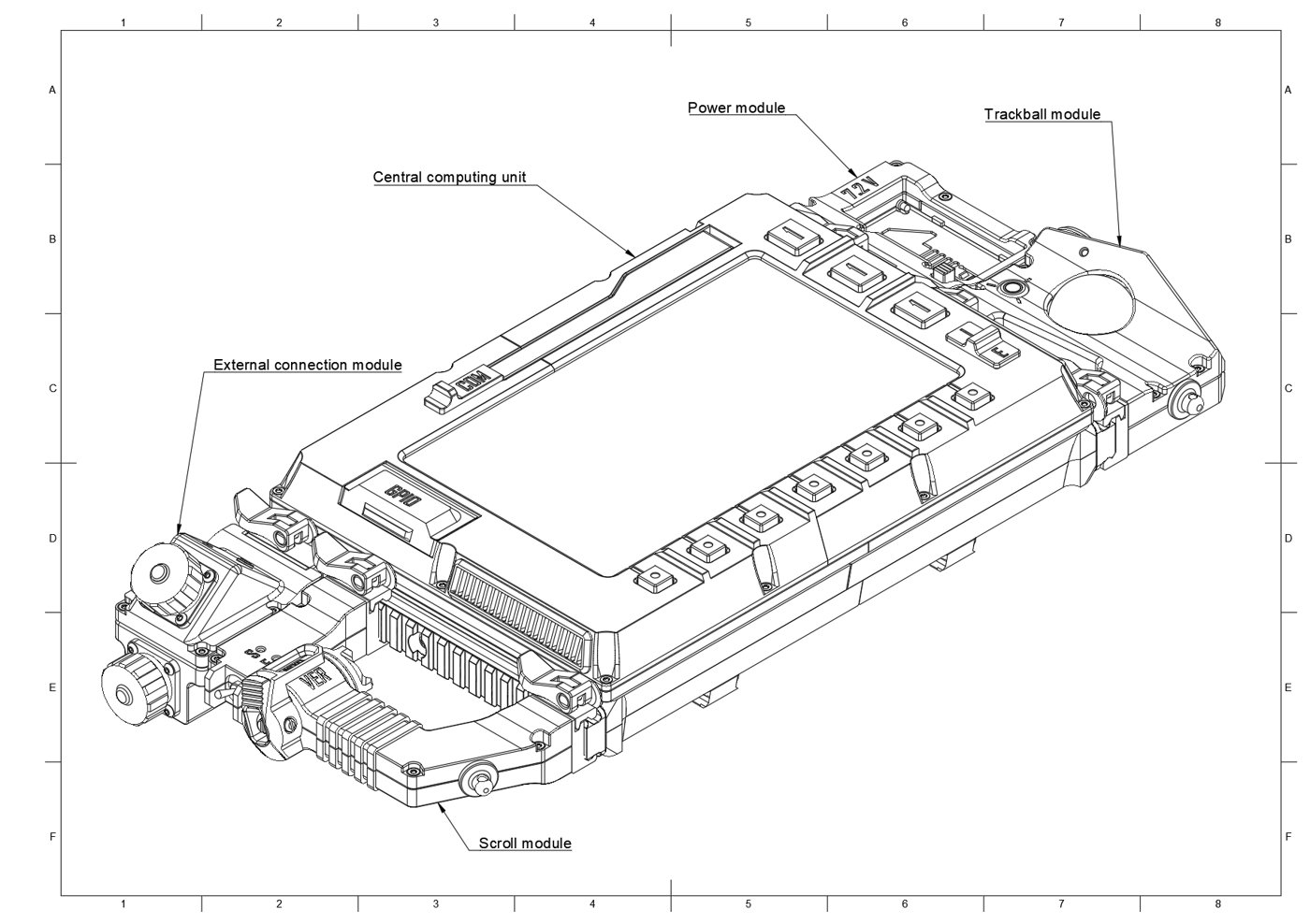
1.3.1 Modular-core architecture
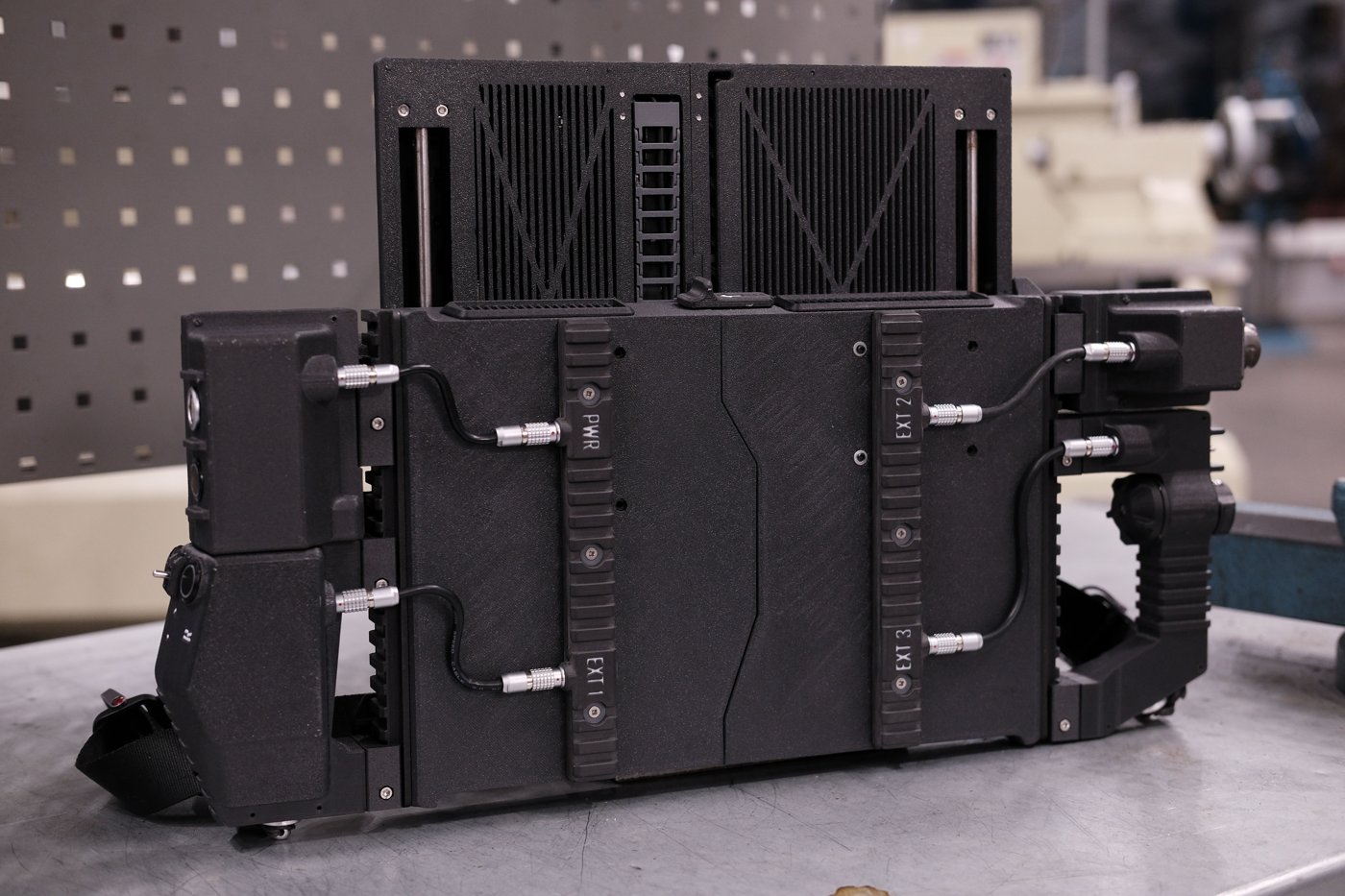
The DFCD is built around a modular core chassis with defined attachment points. The rear of the chassis carries USB power and signal rails so that modules mechanically docked to the chassis can receive both power and data without loose wiring. The drag-chain on the rear routes cables cleanly as the sliding screen travels on its rail — a detail that matters over the lifetime of a device that will be opened and closed thousands of times.
Two modules are identified in the upstream build as not yet wired: the left connection module (expansion ports for external devices) and the scrolling handle (ergonomic navigation control for vertical and horizontal panning). Both have established mounting geometry; the wiring is the outstanding work. This is an honest WIP status — the device works as documented for its primary use case, and the remaining modules represent the next phase of the design.
Shoulder-strap mounts allow the DFCD to be carried between areas of the shop hands-free. This is a practical detail that separates a shop tool from a bench fixture: a device that can only sit on a flat surface is useful in fewer situations than one that can be slung over a shoulder during a walk between the CNC and the assembly table.
The upstream design philosophy explicitly encourages community modification. The STEP files are there to be adapted — different modules, different rail widths, different screen sizes, different compute boards. The DFCD is a platform, not a finished product.
1.3.2 The upstream project
The DFCD was designed and built by the ArcticEnrichmentCenter. The upstream GitHub repository (https://github.com/ArcticEnrichmentCenter/DFCD-cyberdeck-files) contains:
- STEP files for the core chassis and all modular components
- Mesh files for direct 3D-print submission without CAD software
- STEP files for the drag-chain cable management parts
- A hardware list (
Hardware list.md) identifying every purchased component with quantities - Assembly documentation (via the project wiki and the build video at https://youtu.be/gIWp_F9PPzI)
PCBWay manufacturing services can produce parts from the upstream STEP files for builders who do not have access to a 3D printer. The project had 593 stars and 59 forks as of mid-2026.
The repository’s current status note is direct: the screen is working, the keyboard types, and the trackball rolls. The scrolling handle and left connection module remain unwired in the reference build, and the trackball electronics are slated for a custom-PCB replacement. Everything else is functional.
1.4 Spec Summary
Table 2 — 4. Spec Summary
| Parameter | Value | Notes |
|---|---|---|
| Compute | Raspberry Pi 5, 8 GB | |
| Cooler | Joy-it Pi 5 aluminum case/heatsink | |
| OS | Raspberry Pi OS (recommended); any Pi-compatible OS viable | See Vol 6 |
| Display | 10.1-inch IPS touch LCD | |
| Display connection | Micro HDMI → ribbon cable, 90°, 50 cm | |
| Keyboard | NOS C-450 Mini Pro — 60%-class 62-key mechanical (Outemu Red), hidden beneath sliding screen | Upstream list labels it “NOS 450 TKL”; the linked product is 60%-class (see Vol 2) |
| Trackball | Harvested Logitech Marble electronics | Custom PCB planned |
| Battery | NP-F 10050 mAh, USB-C input | 7.2 V nominal |
| Power conversion | Joy-it step-down module | 7.2 V → 5.1 V |
| Chassis | 3D-printed; STEP + mesh files in upstream repo | Material: [VERIFY] |
| Cable management | Drag-chain, rear-mounted | |
| Rear connectivity | USB power/signal rails | |
| Transport | Shoulder-strap mounts | |
| Controls | Rotary encoder (×1), 16 mm momentary switches (×3), 12×12 mm tactile buttons (×10), 12 mm momentary switch (×1), toggle switches (×2), slide switch (×1) | |
| Connectors | 0B self-locking (×6 pairs), 2B self-locking (×1 pair), Y2M 8-pin (×2 pairs), pogo pins GF50-09140-4024 (×2) | |
| Indicators | 3 mm LEDs (×4) | |
| Left module | Connection module — not yet wired (WIP) | |
| Scrolling handle | Not yet wired (WIP) | |
| Build video | https://youtu.be/gIWp_F9PPzI | |
| Upstream repo | https://github.com/ArcticEnrichmentCenter/DFCD-cyberdeck-files |
1.5 Where Each Volume Goes Deeper
Volume 1 (this volume) establishes the context: what the DFCD is, why it was built the way it was, and how to navigate the series. The remaining volumes each take one functional layer to real depth.
Volume 2 — Bill of Materials & Sourcing covers every line of the upstream hardware list in detail: the rationale for the Raspberry Pi 5 over other Pi variants, the NP-F battery and step-down module selection, the NOS C-450 Mini Pro keyboard, the Logitech Marble trackball harvest, the connector and control parts, and sourcing notes for each item. Builders who want to replicate or adapt the design begin here.
Volume 3 — Printing the Chassis covers the STEP and mesh file inventory from the upstream repository, print settings (orientation, layer height, infill, material), post-processing for the structural components, and the drag-chain assembly. It addresses material selection — the tradeoffs between PLA, PETG, and ABS for structural parts that may live in a warm shop environment.
Volume 4 — Assembly & Wiring walks through the complete physical build: the sliding screen mechanism and its rail, the trackball module, the NP-F power path from battery through step-down to the Pi, the rear USB rails, the shoulder-strap mount attachment, and the drag-chain routing. The connector and control parts (pogo pins, self-locking connectors, switches) are wired here.
Volume 5 — Power System addresses the power engineering: what an NP-F battery is and why it was chosen, how the Joy-it step-down module converts 7.2 V to the Pi 5’s required 5.1 V, runtime math against the Pi 5’s power envelope, and charging. It cross-references the PiFlux deep-dive for the Pi 5 thermal and power characterisation.
Volume 6 — OS & FreeCAD Setup covers the software side of the DFCD: Raspberry Pi OS installation, FreeCAD installation and the specific settings that improve usability on a 10.1-inch touch display with trackball input, and performance notes for typical workshop tasks. It cross-references the PiFlux multiboot volume for alternative OS options.
Volume 7 — Living With It & Roadmap covers field use and the evolution of the design: practical notes on living with the current reference build, the outstanding WIP items (left connection module, scrolling handle, custom trackball electronics), the community modification culture, and the upgrade path as the Pi 5 platform matures.
1.6 Platform Cross-Reference: PiFlux
The DFCD’s compute platform is the Raspberry Pi 5, which is also the subject of the PiFlux deep-dive in this Cyberdecks hub (../../PiFlux/). The PiFlux series covers the Pi 5 at platform depth: architecture characterisation, memory bandwidth, thermal limits under sustained load, M.2 NVMe and HAT+ expansion, multiboot OS setup, and the full add-on ecosystem.
The DFCD volumes do not duplicate that material. Where a DFCD volume (notably Vol 5 — Power System and Vol 6 — OS & FreeCAD Setup) would otherwise need to explain Pi 5 power draw, thermal limits, or OS selection at depth, it cross-references the relevant PiFlux volume. Readers who want the full Pi 5 platform story — independently of the DFCD chassis — should begin with the PiFlux overview.
1.7 Resources
Table 3 — 7. Resources
| Resource | URL |
|---|---|
| Upstream DFCD repo (STEP, mesh, hardware list, docs) | https://github.com/ArcticEnrichmentCenter/DFCD-cyberdeck-files |
| Build video | https://youtu.be/gIWp_F9PPzI |
| FreeCAD (open source) | https://www.freecad.org/ |
| Raspberry Pi 5 product page | https://www.raspberrypi.com/products/raspberry-pi-5/ |
| Joy-it Raspberry Pi 5 cooler / case | [VERIFY: exact product page URL] |
| NOS C-450 Mini Pro keyboard (60%-class) | [VERIFY: vendor URL] |
| PiFlux deep-dive (Pi 5 platform) | ../../PiFlux/ |
| PCBWay (print/machine parts from STEP) | https://www.pcbway.com/ |
Comments (0)